How To Activate TM SIM Card 2026: Complete Guide For User
How To Activate TM SIM Card 2026 is a common concern for new users facing No Service or network issues. If your TM SIM is not working, there is no need to panic. This usually happens when the SIM is not fully activated or a basic setup step is missed. TM, also known as Touch Mobile, runs on the Globe Telecom network, which offers wide coverage across the Philippines.
Most TM SIM problems are caused by delayed activation, weak signal, missing SIM registration, or incorrect phone settings. This guide explains simple steps to activate your TM SIM, fix no service errors, reactivate inactive SIMs, and enable 5G services easily.


What Is TM SIM Activation?
TM SIM activation is the process that makes your TM SIM card ready to use. After activation, you can make calls, send texts, and use mobile data. Without activation, the SIM may show No Service or stop working.
TM SIM activation connects your SIM to the TM network, which is operated by Globe Telecom. Activation usually happens automatically, but sometimes it needs a manual step like dialing *143#, sending a text, or making a call. Proper activation ensures your SIM works smoothly and stays active.
Read Also: Best TM Promos
What To Prepare Before Activating Your TM SIM Card
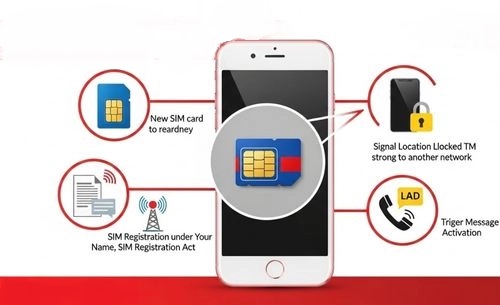
Before you start the TM SIM activation process, make sure a few basic things are ready. These small checks save time and prevent activation failure.
- First, confirm that your TM SIM card is brand new or still active. Old or damaged SIM cards may not connect properly to the network.
- Second, your phone must be unlocked. A locked phone can block the TM signal, even if the SIM is working.
- Third, stay in an area with good TM network coverage. Weak signals often cause “No Service” problems during activation.
- Fourth, remember that under the SIM Registration Act, your TM SIM must be registered using valid ID details. Activation may work first, but unregistered SIMs can later be blocked.
- Finally, keep a small load balance. Some activation methods need a call or text to trigger the system.
TM SIM Card Activations Methods
How to Activate TM SIM Card Automatically
This is the easiest and most common way to activate a TM SIM card. In many cases, TM SIM activates by itself.
Steps for Automatic TM SIM Activation
- Turn off your phone.
- Insert the TM SIM card properly into the SIM slot.
- Turn the phone back on.
- Wait for a few minutes.
- Look for network bars on the screen.
- You will receive a welcome or activation SMS.
If you don’t receive any message, restart your phone once again. This simple step fixes most issues.
Using *143# Code
If automatic activation does not work, you can activate TM SIM manually using a USSD code.
Steps to Activate TM SIM via *143#
- Open your phone dialer.
- Dial *143#.
- Select the TM menu from the list.
- Choose SIM activation or SIM status.
- Follow the instructions on the screen.
- Wait for confirmation SMS.
If the menu does not load, move to a place with a stronger signal and try again.
Via Text or Call

This method is helpful when your TM SIM shows “No Service” or limited signal.
Steps
- Send a short SMS to any active number
OR - Make a quick call and disconnect after a few seconds
This action triggers the TM network system. After that, wait for an activation message or signal update.
Tip: If the text or call fails, load a small amount of balance and try again.
Using Mobile Data
Sometimes, TM SIM activates when mobile data is turned on.
Steps
- Turn on mobile data.
- Open any browser or app.
- Let the phone connect to the internet.
- Wait for automatic configuration messages.
If data does not work, check APN settings and restart the phone.
Via Contact TM Customer Service
If none of the above works, customer support can help.
Steps:
- Dial 808 from your TM SIM
- Tell them: My TM SIM is not activating
- Share SIM details if asked
You may be guided remotely or asked to visit a Globe Store.
Tip
If visiting a store, bring:
- Valid ID
- SIM pack
- Your phone
Read Also: TM Surf4All99 Promo
How To Activate TM SIM Card Again (Reactivation)
If your TM SIM stopped working after inactivity, it may need reactivation.
Common Reasons for Deactivation
- SIM not used for a long time
- SIM not registered
- No load for several months
How to Reactivate TM SIM
- Restart your phone
- Insert the SIM properly
- Dial *143# to check status
- Add load and send a text
- Contact TM customer service at 808
- Visit the nearest Globe Store if needed
In some cases, the SIM may need replacement if it is expired.

How To Activate TM SIM Card 5G
TM SIM supports 5G, but your phone and location must also support it.
Requirements for TM 5G
- 5G-supported phone
- Updated software
- 5G-covered area
- Active TM SIM
Steps to Enable 5G
- Go to phone settings.
- Open Network or Mobile settings.
- Select Network Mode.
- Choose 5G or Auto.
- Restart the phone.
If 5G does not appear, your area may not support it yet.
Read Also: Fastest TM APN Setting
What to Do After Activating Your TM SIM Card
After activating your TM SIM, do not stop there. A few important steps are still needed. These steps help you call, text, and use the internet without issues. They also protect your SIM from blocking or deactivation later.
Follow each step carefully to enjoy a smooth TM experience.
Step 1: Register Your TM SIM Card
- SIM registration is mandatory in the Philippines.
- If your SIM is not registered, it may stop working anytime.
Under the Philippine SIM Registration Act, every TM user must register their SIM under their own name. This rule helps prevent fraud and misuse.
What you should do:
- Register your TM SIM through the official TM or Globe portal
- Or visit the nearest Globe Store
- Keep a valid ID ready during registration
If a SIM stays unregistered, it can be blocked or permanently deactivated. Registering your SIM keeps your number active, secure, and safe for long-term use under the Globe Telecom network.
Step 2: Subscribe to TM SIM Promos
Once your SIM is active and registered, the next step is choosing a promo. TM offers many low-cost promos for daily use.
How to subscribe:
- Dial *143# and explore TM promos
- Or use the GlobeOne App for a faster experience
You can find:
- Unlimited text offers
- All-network call promos
- Affordable data bundles
Choosing the right TM promo helps you stay connected without spending too much.
Step 3: Fix TM SIM Not Working or “No Service” Issues
Sometimes, a TM SIM may show No Service even after activation. This is common and usually easy to fix.
Try these quick fixes:
- Restart your phone
- Remove and reinsert the SIM properly
- Turn Airplane Mode on, then off
- Set network mode to Automatic
- Check if your SIM is registered
- Make sure you have enough load
If the problem continues:
- Call TM customer service at 808
- Or visit the nearest Globe Store
The support team can reconfigure your SIM or replace it if needed.
Step 4: Load Your TM SIM Card

A TM SIM needs load to work fully. Without load, you cannot:
- Make calls
- Send texts
- Subscribe to promos
Where you can load:
- TM or Globe retailers
- GCash
- Convenience stores
- Online e-load platforms
Keeping a small balance on your SIM helps avoid sudden service issues.
Step 5: Check Your Load Balance and Data Usage
Regularly checking your balance helps you manage promos and avoid sudden disconnection.
How to check balance:
- Dial *143# → Balance Inquiry
- Or text BAL to 8080
You will receive an SMS showing:
- Remaining load
- Active promos
- Promo expiry date
Checking your balance often ensures smooth calling, texting, and internet use.
Common TM SIM Activation Problems and Solutions
Here are some of these common problems:
- SIM Not Registered: Register your SIM to avoid blocking.
- Weak Signal: Move to a better location.
- Wrong SIM Insertion: Reinsert SIM properly.
- Insufficient Load: Add small balance.
- USSD Errors: Retry after some time.
- Phone Compatibility: Use an unlocked GSM phone.
- Incorrect APN: Set correct TM APN.
- Expired SIM: Visit Globe Store for replacement.
Read Also: TM EZ70 Promo Guide
How To Check if Your TM SIM Is Activated
After inserting a TM SIM card, many users feel confused. They ask, “Is my TM SIM active or not?” The good news is, you can check this in a few easy ways. No technical knowledge is needed. Follow the steps below one by one.
Step 1: Check TM SIM Activation Using USSD Code
This is the fastest and most reliable method.
What to do:
- Open your phone dialer
- Dial *143#
- Select the TM menu
- Wait for the response
What it means: If the menu opens or you receive a confirmation message, your TM SIM is active and working.

Step 2: Check TM SIM Activation Using SMS
This method also confirms activation and balance at the same time.
What to do:
- Open your messaging app
- Type BAL
- Send it to 8080
What it means: If you receive an SMS showing your load or promo details, your TM SIM is properly activated.
Step 3: Check Network Signal Bars on Your Phone
This is a simple visual check.
What to do:
- Look at the top of your phone screen
- Check for signal bars
- See if the network name shows TM
What it means: If you see signal bars with the TM network name, your SIM is connected and active.
Step 4: Make a Test Call or Send a Text
This is the final and most practical check.
What to do:
- Make a short call to any number
OR - Send a simple SMS
What it means: If the call connects or the message sends successfully, your TM SIM is ready for daily use.
Read Also: TM EasySurf Promos
Benefits of Activating a TM SIM Card
Activating a TM SIM card gives you many useful benefits. TM is designed for daily users who want low cost and reliable service in the Philippines.
Affordable Call, Text, and Data Promos
TM offers very cheap promos for calls, texts, and mobile data. You can choose daily, weekly, or monthly packages. This helps students, workers, and families save money on mobile usage.
Wide Network Coverage
TM is powered by Globe Telecom. Because of this, TM works well in cities, towns, and many rural areas. You stay connected even while traveling.
Easy and Fast SIM Activation
TM SIM activation is simple. You can activate it automatically, by dialing *143#, by sending a text, or by making a call. Even beginners can activate their SIM without help.
Supports 4G and 5G Internet
TM SIM cards support fast internet speeds. If you have a 5G phone and live in a covered area, you can enjoy smoother browsing, video streaming, and online work.
Budget-Friendly for Daily Use
TM is ideal for users who want control over spending. You can load small amounts and still enjoy useful promos. There is no need for expensive plans.
Reliable Customer Support
TM provides customer support through hotline 808 and Globe Stores. If your SIM has issues like no service or deactivation, help is easily available.
Read Also: TM Balance Inquiry
FAQs About TM SIM Activation
Conclusion
Activating a TM SIM card is simple when done the right way. Most issues happen because of weak signals, unregistered SIMs, or inactive balances. By following the correct steps, you can activate your TM SIM without stress. Always register your SIM, keep a small load, and monitor your balance. TM remains a reliable choice for affordable calls, texts, and data across the Philippines. With proper activation and care, your TM SIM will stay active, stable, and ready for daily use.