TM Customer Service Number 24/7 Philippines 2027: Complete Guide To TM Toll-Free Contact And Email Assistance
TM Customer Service Number 24/7 Philippines 2027. If you are a TM user in the Philippines, you may need help with your SIM, load, promos, or internet. Many users search for the TM customer service hotline, TM customer service number, or the TM customer service cellphone number to solve their issues quickly.
Some also look for the TM customer service number 24 7 Philippines, the TM customer service hotline toll free number, or the official TM customer service email Philippines for direct support.
TM Tambayan makes it easy to get assistance anytime. You can call the hotline, chat through Messenger, use the GlobeOne App, or visit a nearby service center. In this guide, you will find all official contact details explained clearly so you can contact TM customer service without confusion.


What is TM Tambayan Network in the Philippines?
TM Tambayan is a prepaid mobile brand under Globe Telecom. TM is very popular because it offers affordable promos, load, calls, and internet data. Many students, workers, and families use TM daily. Because of this, customer service is very important. TM gives support in three main ways:
Messenger Chatbot
Hotline Number
GlobeOne App
All these channels are available 24/7 in the Philippines.
Read also: How To Convert Physical TM SIM To eSIM
TM Customer Service Hotline (24/7 Philippines)
If you want fast help, calling is the best option.
TM Customer Service Hotline Number
Here are the official numbers:
For TM Users:
- Dial 808 from your TM mobile number.
This connects you directly to TM customer service.
For Landline or Other Networks:
- Call (02) 7730-1500
You can use this number if:
- You are calling from a Globe landline
- You are calling from another network
For Users Abroad:
- Call (+632) 7730-1000
This is helpful if you are outside the Philippines but still using a TM SIM.
TM Customer Service Through Messenger (Chat with Timmy)
TM provides 24/7 chat support through its official Messenger chatbot called Timmy. This is one of the easiest ways to get instant help without making a phone call.
How to Access TM Messenger Support
- Step 1: Click the “Chat with Timmy” button on the official TM page.
- Step 2: Or open Facebook and search for “TM Tambayan.”
- Step 3: Open the official page and tap on the “Messenger” button.
- Step 4: Choose the service option that matches your concern.
- Step 5: Follow the instructions given by Timmy to complete your request.
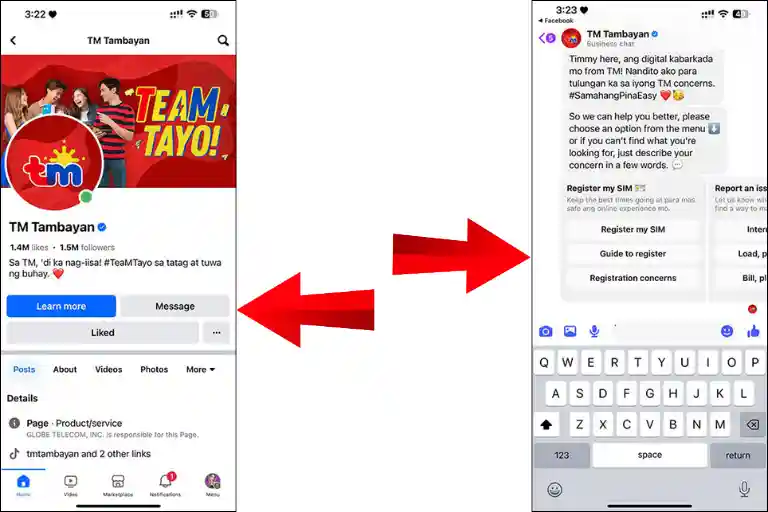
The chatbot works anytime, day or night.

Services Available Through Messenger
Through Messenger, you can:
- Access the official SIM registration link
- Get step-by-step guidance for SIM registration
- Ask questions about registration problems
- Report internet connection or signal issues
- Check load balance and promo status
- Report issues with rewards or bill payments
- Manage your TM account and update details
- Request line reconnection
- Track previous requests or applications
- Buy TM promos and activate SIM or eSIM
- Report spam or scam messages
- Report lost SIM or mobile device
- Raise concerns related to GCash or GlobeOne App
If your concern needs human assistance, you can request to speak with a live agent. If chatbot cannot solve your issue, type: “Talk to agent” Then you may be connected to a real customer service representative.
Read Also: How To Transfer Or Convert TM Load To GCash
TM Customer Service Through Hotline Number
If you prefer speaking directly with a representative, you can contact the TM hotline. This method is best for urgent concerns.
Official TM Hotline Numbers
- Dial 808 from your TM SIM to speak with customer service.
- Call (02) 7730-1500 from a landline for assistance.
- If you are outside the Philippines, dial (+632) 7730-1000 for support.
The hotline helps with:
- SIM registration issues
- Load and promo concerns
- Account verification
- Technical problems
- General service inquiries
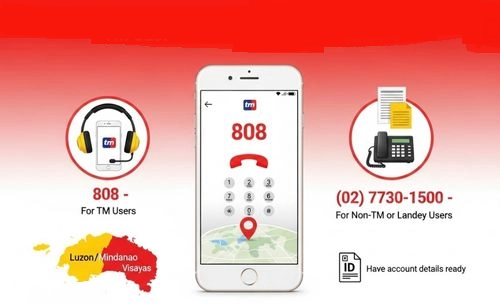
Make sure to prepare your TM number and account details before calling for faster assistance.
TM Customer Service Using GlobeOne App
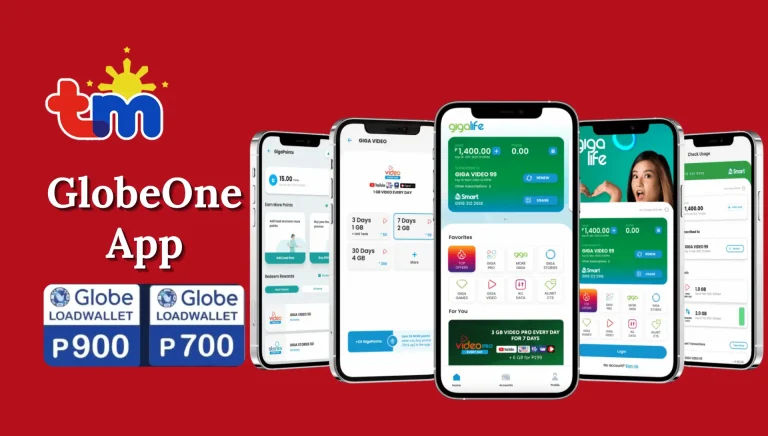
GlobeOne App is another convenient way to manage your TM account and request support directly from your phone.
How to Get Help Through GlobeOne App
Step 1: Download and install the GlobeOne App on your smartphone.
Step 2: Log in using your TM mobile number.
Step 3: Open the dashboard and tap on the “Help” section.
Step 4: Select your registered TM account.
Step 5: Choose the issue that matches your concern.
Step 6: Submit your request and follow the instructions provided.
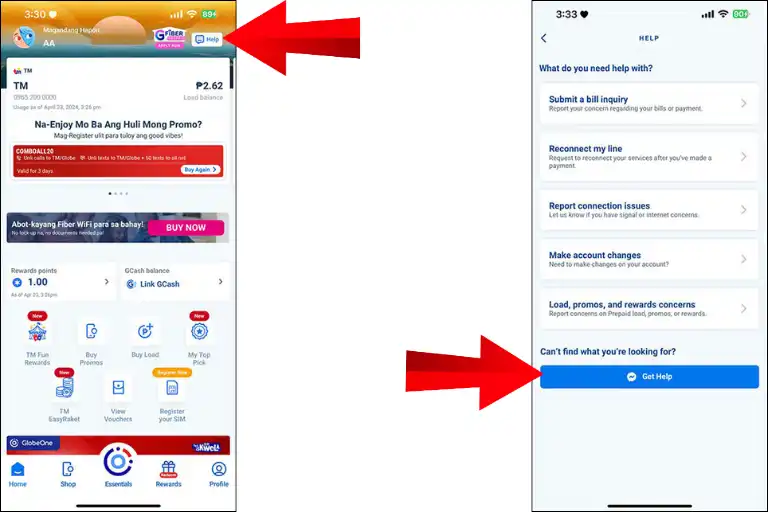
Through the app, you can manage your account, check your balance, register promos, and contact support in one place.
This method is very helpful if:
- You want to check balance
- You want to register promos
- You want to manage your account
- You want quick chat help
Read also: How To Redeem Points In TM
Is TM Customer Service 24/7?
Yes. The TM customer service number 24 7 Philippines support is available all day and night. You can call:
- Morning
- Afternoon
- Midnight
- Even on holidays
But during busy hours, you may wait a few minutes.

Is TM Customer Service Hotline Toll Free?
If you call 808 from your TM SIM, it is usually free or charged at minimal TM rates. If you call using a landline, charges may apply depending on your provider.
Tip: Always ask about call charges before long calls.
How To Call TM Customer Service
Let me explain it in very simple steps.
- Unlock your phone
- Open the dial pad
- Dial 808
- Listen carefully to the automated menu
- Press the number based on your issue
For example:
- Press for load problems
- Press for promo issues
- Press for SIM concerns
- Press to talk to a live agent
When connected, explain your problem clearly. Keep ready:
- Your TM mobile number
- Last transaction details
- Any reference number
This helps the agent solve your problem faster.
Read Also: TM EZ99 Promo Philippines
TM Service Center Locations
If you prefer in-person help, visit a TM or Globe store. TM and Globe share service centers. You can:
- Replace SIM
- Fix network problems
- Ask about billing
- Solve technical issues
- Register SIM
To find nearest store, use Globe Store Locator on official Globe website. Before visiting, bring:
- Valid ID
- Your TM SIM
- Phone
- Any receipts
Most stores are open Monday to Saturday. Mall branches follow mall timings.
TM Customer Service Email Philippines

Many users ask about TM customer service email Philippines. For general concerns, TM support is mostly handled through:
- Hotline
- Messenger
- GlobeOne App
However, Globe corporate emails are available for specific departments such as:
- Investor relations
- HR
- Ethics
- Sustainability
- Supplier concerns
But for regular TM SIM users, calling 808 or using Messenger is faster.
TM SIM Registration Help
If your problem is related to SIM registration: You can:
- Use Messenger for registration link
- Call hotline 808
- Visit service center
Keep ready:
- Valid ID
- Personal details
- SIM number
TM Load And Promo Problems
Common issues:
- Load not received
- Promo not activated
- Data not working
- Balance deducted
First, try this:
- Restart your phone
- Check signal
- Check balance
- Wait 5 minutes
If still not working:
- Call 808
- Chat via Messenger
- Use GlobeOne App
Read Also: TM Combo 10 Promo
How To Contact Globe At Home Customer Service (For Internet Users)
If you are using Globe At Home internet and facing slow speed, no connection, billing issues, or installation problems, you can contact support easily. Follow the steps below.
1: Call Globe At Home Hotline (24/7 Support)
Globe Telecom provides 24/7 customer support for Globe At Home users.
Step 1: Open your phone dial pad.
Step 2: Dial (02) 7730-1000 from any mobile or landline.
Step 3: Listen carefully to the automated menu.
Step 4: Select the option related to your issue (internet, billing, installation, etc.).
Step 5: Speak clearly with the agent and explain your concern.
Tip: Keep your account number or registered mobile number ready for faster verification.
2: Chat Online with Globe Virtual Assistant
You can also chat instead of calling.
Step 1: Visit the official Globe website or open the GlobeOne App.
Step 2: Log in using your registered number.
Step 3: Tap on “Help” or “Chat with Us.”
Step 4: Start chatting with Gie, the official virtual assistant.
Step 5: Type your issue (slow internet, payment issue, plan upgrade, etc.).
If needed, you will be connected to a live agent.
3: Visit a Globe Store (Face-to-Face Help)
If you prefer personal assistance, visiting a store is a good option.
Step 1: Search for the nearest Globe Store using the official store locator.
Step 2: Book an appointment online to avoid waiting.
Step 3: Choose your preferred date and time.
Step 4: Visit the store with your valid ID and account details.
Store staff can help with:
- Plan upgrades
- Device replacement
- Billing clarification
- Technical support
Why TM Customer Service is Helpful
TM support is helpful because:
- Available 24/7
- Multiple contact options
- Easy chatbot support
- Nationwide service centers
- Support even abroad
This makes it easy for every TM subscriber.
Globe Landline and Store Appointment Services
If you need help with your TM or Globe service and cannot use mobile data, do not worry. You can still contact support easily. Below is a simple and professional step-by-step guide.
1: Contact Through Globe Landline
Using a Globe landline is a safe and stable way to reach customer support. It is helpful when:
- You have no mobile load
- Your internet is not working
- You need clear communication for billing issues
Steps to Contact via Landline:
- Go to any Globe landline phone.
- Dial the official Globe customer service number.
- Listen carefully to the automated menu.
- Choose the option related to your issue.
- Speak clearly with the customer support agent.
Tip: Keep your account number or registered mobile number ready. This helps in quick verification. This method is reliable for discussing:
- Billing concerns
- Account verification
- Service updates
- TM or Globe-related issues
2: Book a Store Appointment (Face-to-Face Help)
If you prefer personal assistance, visiting a Globe Store is a good option. To avoid long waiting time, it is better to book an appointment first.

Steps to Book an Appointment:
- Visit the official Globe website.
- Open the Store Appointment section.
- Choose your nearest Globe Store.
- Select your preferred date and time.
- Mention the reason for your visit.
- Confirm your booking.
When you arrive at the store, an agent will already be prepared to assist you. This method is best for:
- SIM replacement
- Account changes
- Device concerns
- Billing disputes
- Technical support
Read Also: How To Deactivate TM SIM Card Online
FAQs
Conclusion
TM customer service makes support simple and available anytime in the Philippines. You can dial 808 from your TM SIM for 24/7 help. Landline users can call (02) 7730-1500, and users abroad can contact (+632) 7730-1000. You can also chat through the TM Messenger chatbot or use the GlobeOne App for quick assistance. For face-to-face help, visit a nearby TM or Globe service center. Whether your issue is load, promos, SIM registration, or signal, support is always ready.