TM Balance Inquiry In 2026: How to Check TM Sim Balance Via SMS, Call, USSD Code And App
TM Balance Inquiry. If you are a TM user, checking your remaining load and data is very important to avoid sudden service interruption. TM makes balance inquiry simple and fast for everyone. You can check your TM balance via SMS, by dialing the TM balance inquiry number, through a call, using the USSD code *143#, or through text commands.
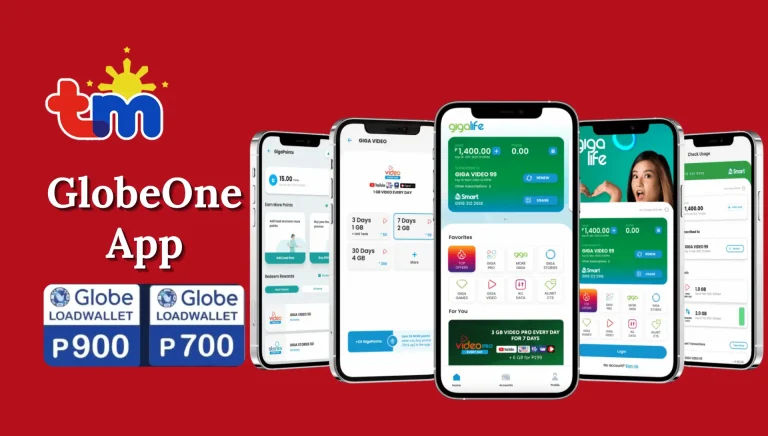
You can also monitor your balance and promos using the GlobeOne app. These methods work on both smartphones and basic phones, with or without internet. In this guide, you will learn how to dial TM balance inquiry and check your load anytime.


What Is TM Balance Inquiry?
TM balance inquiry means checking your remaining prepaid load, data balance, call minutes, and text allocation on your TM SIM card. TM provides several official ways to check balance. These methods help users monitor usage and reload on time. When you know your TM balance, you can:
Avoid sudden call disconnection
Manage data usage properly
Track active promos
Reload before your balance finishes
TM balance inquiry works on both smartphones and basic phones.
Read Also: Best TM Promos
Why TM Balance Inquiry Is Important
Many TM users face problems because they do not check their balance regularly. Checking your balance helps you stay in control. Here are some reasons why TM balance inquiry is important:
- Prevents sudden service interruption
- Helps control data usage
- Avoids unnecessary reloads
- Keeps track of promo validity
- Saves money in the long run
Regular balance checking is a good habit for every TM subscriber.
TM Balance Inquiry Methods
TM offers multiple ways to check balance. Some methods are free, while some may charge a small fee. Let’s explain each method step by step.
Via SMS (Text Message)
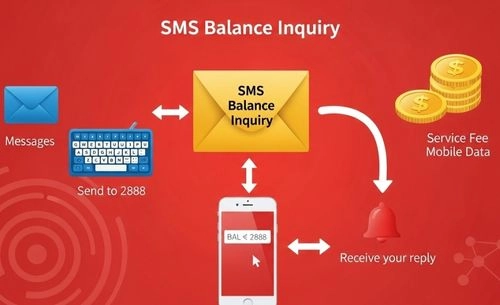
Checking your TM balance by SMS is one of the easiest and fastest options. This method works on all mobile phones and does not need internet.
Steps to Check TM Balance via SMS
- Open the Messages app on your phone.
- In the message box, type BAL.
- Send this message to 2888.
- Wait for a reply from TM.
You will receive a text showing:
- Your remaining load balance
- Active TM promos
- Promo validity
Note: A small service fee may be charged for each TM balance inquiry via SMS.
Tip: This method works even without mobile data. It is the fastest way to check your TM balance anytime.
Through Call
If you do not want to type a message, you can check your TM balance through a simple phone call.
Steps to Check TM Balance via Call
- Open the dial pad on your TM mobile phone.
- Dial 222 and press the call button.
- Listen carefully to the voice instructions.
- Your remaining TM balance will be announced shortly.
Note: A small fee may be deducted for this balance inquiry via call.
Tip: This method is perfect for quick balance checking. You do not need to type anything or use mobile data.
Via USSD Code
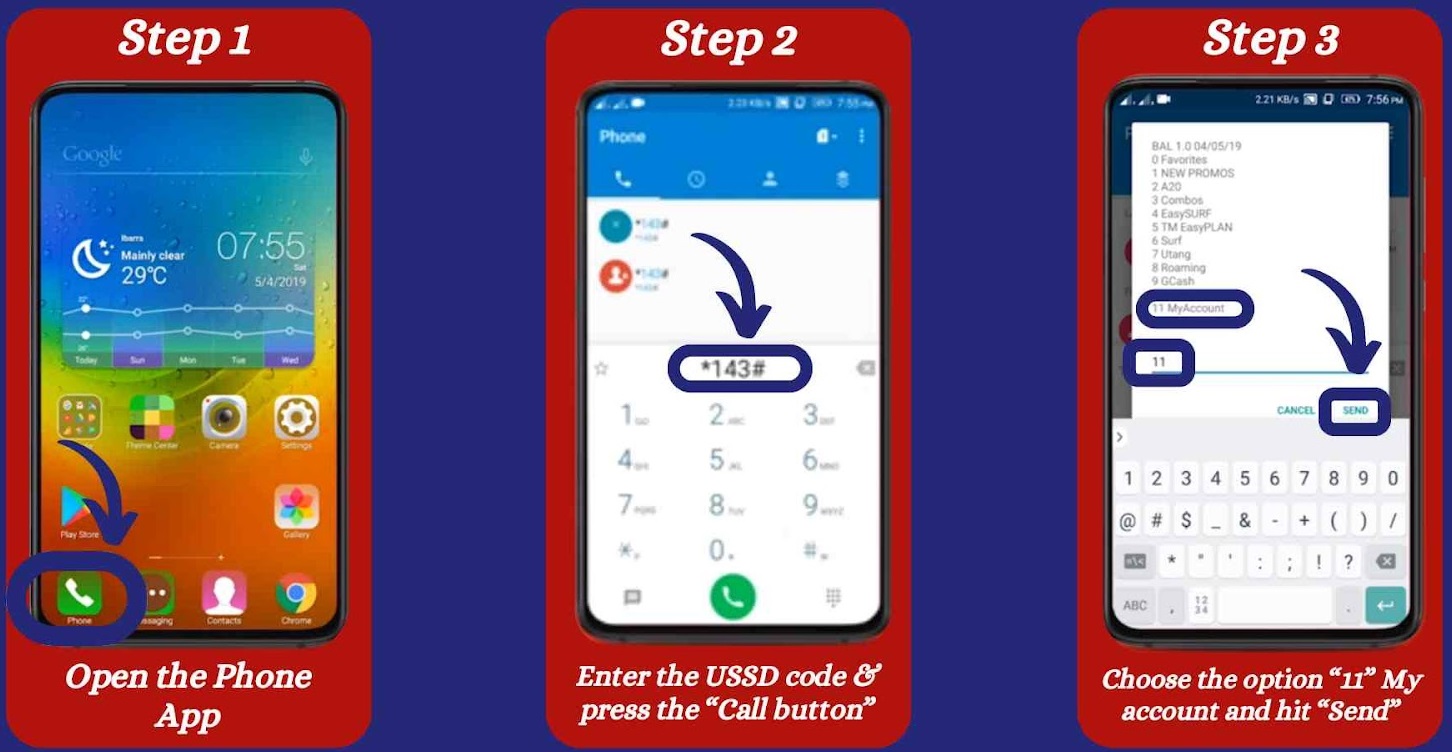
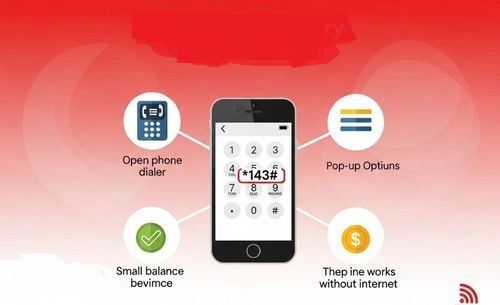
Using a USSD code is another quick and reliable way to check your TM balance. This option also works without internet.
Steps to Check TM Balance Using USSD Code
- Open your phone’s dialer.
- Dial *143# and press the call button.
- A menu will appear on your screen.
- Select Balance Inquiry or Check Balance from the options.
- Wait a few seconds to receive your balance details via text.
Note: Some USSD balance checks may deduct a small service fee.
Tip: The TM USSD code method is fast and works on all phones. No internet connection is required.

Using the GlobeOne App
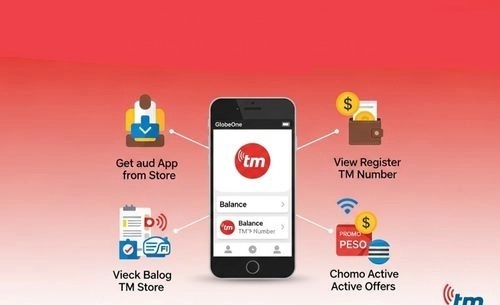
If you prefer checking your balance online, the GlobeOne app is the best option. It shows complete account details in one place.
Steps to Check TM Balance Using GlobeOne App
- Download and install the GlobeOne app from the Google Play Store or App Store.
- Open the app and register your TM number.
- Log in to your account.
- Your remaining load balance will appear on the home screen.
Inside the app, you can also see:
- Active promos
- Data balance
- Promo validity
Note: This method is free, but you need mobile data or Wi-Fi to use the app.
Tip: The GlobeOne app is the easiest way to monitor your TM load and promos in real time.
Read Also: Fastest TM APN Setting
How to Check TM Data Balance
If you use mobile internet daily, it is very important to check your TM data balance. Many users lose data without knowing. Then suddenly internet stops. That feels very annoying. To avoid this problem, you should check your remaining MBs or GBs regularly. Below are the easiest and official ways to check your TM data balance.
Via SMS
This method works on all phones. No internet needed.
Steps:
Step 1: Open your phone’s Messages app.
Step 2: Type DATA BAL.
Step 3: Send it to 8080.
Step 4: Wait for the reply message.
You will receive details about:
- Remaining MBs or GBs
- Active promo
- Expiry date
Tip:
You can also send:
- EZ INFO to 8080
- SURF BAL to 8080
These keywords show full promo and data information.
Using USSD Code
If you prefer using a menu system, this method is good for you.
Steps:
Step 1: Open your dial pad.
Step 2: Dial *143#.
Step 3: Press the call button.
Step 4: A menu will appear on your screen.
Step 5: Select Data Balance option.
Step 6: Wait a few seconds to see your remaining MBs.
This method works without mobile data.
Through GlobeOne App
If you want full account details in one place, this method is best.
Steps:
Step 1: Open the GlobeOne App.
Step 2: Log in with your TM number.
Step 3: On the home screen, you will see:
- Load balance
- Data usage
- Active promos
- Expiry date
This method is free. But you need internet or Wi-Fi.
Difference Between TM Balance and Data Balance

Many TM users confuse load balance and data balance. Both are important, but they are used for different purposes. Below is a clear and simple comparison to help you understand the difference easily.
| Feature | TM Balance (Load Balance) | TM Data Balance |
|---|---|---|
| Meaning | This is your regular load credit. It is used for calls, SMS, and other non-internet services. | This is your internet credit. It is used only for mobile data and online activities. |
| Where It Is Used | You use it when making phone calls, sending text messages, or activating call and text promos. | You use it when browsing the internet, using Facebook, YouTube, TikTok, or other apps. |
| When It Decreases | It decreases when you call someone, send SMS, or subscribe to voice/text promos. | It decreases when you use mobile data for browsing, streaming, downloading, or using online apps. |
| How to Check | • Send BAL to 222 • Dial *143# • Check in GlobeOne App | • Send DATA BAL to 8080 • Dial *143# and select data option • Check in GlobeOne App |
| Simple Example | If you call your friend for 5 minutes, your TM load balance will reduce. | If you watch a YouTube video for 10 minutes, your data balance will reduce. |
| Best Use Tip | Keep enough load if you mostly make calls and send texts. | Keep enough data if you use internet and social media daily. |
Read Also: TM Surf4All99 Promo
How To Inquire TM Balance Without Internet
Sometimes your mobile data finishes. Or maybe you are in an area with no internet signal. Don’t worry. You can still check your TM balance easily. TM provides simple offline methods that work on any phone. Below are the easiest ways to check your TM balance without internet.
Via SMS (No Data Needed)
This is the fastest and most common way.
Steps:
- Open the Messages app on your phone.
- Type BAL in a new message.
- Send it to 2888.
- Wait for a reply from TM.
Within a few seconds, you will receive a message showing:
- Your remaining load balance
- Active promo details
- Promo validity or expiry date
✔ Works on basic and smartphones
✔ No internet required
✔ Simple and quick
A small service fee may apply.
Via USSD Code
If you do not want to send SMS, you can use a short dial code. This method is very reliable.
Steps to follow:
- Open your phone dial pad.
- Dial *143# and press Call.
- A menu will appear on your screen.
- Select Balance Inquiry or My Account.
- Wait for your balance details.
You can also try *2888# if available.
✔ Works without mobile data
✔ Instant result on screen
✔ Compatible with all phones
This method is perfect when SMS reply is delayed.
Via Call
If you prefer listening instead of reading messages, this method is for you.
Follow these simple steps:
- Open your dial pad.
- Dial 222.
- Press the Call button.
- Listen carefully to the voice instructions.
After a few seconds, TM will announce your remaining balance.
✔ No typing needed
✔ No internet required
✔ Easy for all users
A small service fee may be deducted.
TM Promo Balance – How to Check Your Remaining Data Easily
If you are using any TM promo, it is very important to check your remaining data balance regularly. Many users think they still have data, but suddenly their internet stops working. This usually happens when the promo balance finishes. Good news is that checking your TM promo balance is very simple. You can do it in a few seconds. Let’s see the easy steps.
Via SMS
This is the quickest method. It works on all TM promos.
Steps:
- Open the Messages app on your phone.
- Type DATA BAL in the message box.
- Send it to 8080.
- Wait for the reply message from TM.
You will receive an SMS showing:
- Remaining data (MBs or GBs)
- Active promo details
- Promo validity or expiry date
Tip: This method works even without internet. You only need network signal.

Via SMS
If you want more details about your active promo, you can use these keywords:
- Text EZ INFO to 8080
- Or text SURF BAL to 8080
After sending the message, TM will reply with:
- Active promo name
- Remaining data balance
- Expiry date
This is helpful if you forgot which promo you activated.
Via *143# Menu
You can also check your TM promo balance using the USSD code.
Steps:
- Open your phone dialer.
- Dial *143#.
- Press the call button.
- Select My Account or Data Balance from the menu.
- Wait for the balance details on your screen.
This method is very reliable and works on all mobile phones.
Using GlobeOne App
If you prefer a more detailed view, the GlobeOne app is the best option.
Steps:
- Open the GlobeOne App.
- Log in with your TM number.
- On the home screen, you will see:
- Load balance
- Data balance
- Active promos
- Rewards points
This method gives complete account information in one place.
Just make sure you have mobile data or Wi-Fi.
Read Also: TM SurfBOOST15 Guide
How to Check TM Rewards Points Balance
If you want to know your TM Rewards Points, you have two easy options:
Via *143# Menu
- Dial *143#
- Select Rewards
- Follow the steps to view your points
Via GlobeOne App
- Open the app
- Go to the Rewards section
- Check your available points
You can use these points to redeem promos, data, or other rewards.
How Prepaid Users Can Check TM SIM Balance
If you are using a prepaid TM SIM, checking your load balance regularly is very important. It helps you avoid sudden call cuts or data interruption. The good thing is that TM makes the balance inquiry process very simple. Follow these easy steps below to check your prepaid TM balance using the USSD menu.
Step 1: Open Your Phone Dialer
Unlock your phone and go to the dial pad screen.
Step 2: Dial *143#
Type *143# on your keypad.
Step 3: Press the Call Button
Tap the call button to open the TM service menu.
Step 4: Select “My Account”
When the menu appears on your screen, choose the option labeled My Account.
Step 5: Tap on “Balance Inquiry”
From the next menu, select Balance Inquiry.
Step 6: View Your Prepaid Load
Your remaining prepaid load balance will appear on your screen within a few seconds.

This method works on all phones and does not require internet. It is fast, simple, and reliable.
Read Also: TM SIM Replacement With Same Number
How To Set TM SIM Balance Notifications
Sometimes we forget to check our balance. Then suddenly, our load runs out. To avoid this problem, TM allows users to set balance notifications. When your balance goes below a certain amount, you will automatically receive a reminder. Below are different ways to activate TM balance notifications.
Via USSD Code
This method is quick and works without internet.
- Step 1: Dial *143# on your TM phone.
- Step 2: Press the call button to open the TM menu.
- Step 3: Navigate through the menu and look for Balance Notification Settings.
- Step 4: Choose the option to activate balance alerts.
- Step 5: Select your preferred notification amount. For example, you can set it to notify you when your balance drops below ₱50.
- Step 6: Confirm your selection.
Once activated, TM will automatically send you a message when your balance reaches your chosen limit.
Through the GlobeOne App
If you prefer using an app, this method is very convenient.
- Step 1: Open the GlobeOne App on your smartphone.
- Step 2: Log in to your TM account.
- Step 3: Go to the Settings or Preferences section.
- Step 4: Find the option for Balance Notifications.
- Step 5: Set your preferred balance threshold and notification frequency.
- Step 6: Save your changes. After saving, the app will notify you when your balance reaches the selected amount.
Note: You need internet access to use this method.
Via Text Message
This method is simple and works on all phones.
- Step 1: Open your Messages app.
- Step 2: Type the following format: BAL NOTIFY 50 (Replace 50 with the amount you prefer.)
- Step 3: Send it to 222.
- Step 4: Wait for a confirmation message from TM.
Once confirmed, your balance notification will be active.
Through Customer Service
If you are unsure about the steps, you can get help directly from TM support.
- Step 1: Dial 222 on your TM phone.
- Step 2: Follow the voice instructions to connect with a customer service representative.
- Step 3: Request activation of balance notifications.
- Step 4: Provide any required details.
The representative will activate the feature for you.
Common TM Balance Inquiry Issues (And How To Fix Them Easily)
Sometimes, when you try a TM balance inquiry, the result does not appear instantly. This can be confusing, especially when you urgently need to check your remaining load. But don’t worry. Most TM balance problems are small and temporary. Let’s look at the common issues and their simple solutions.
1. TM Balance Not Showing
If your balance is not showing after sending an SMS or dialing a code, it may be due to a minor network delay. Here’s what you can do:
- Restart your mobile phone
- Wait for a few minutes and try again
- Use another method like *143# USSD code or the GlobeOne app
In many cases, restarting your phone refreshes the network connection and solves the issue quickly.
2. Delayed SMS Reply
Sometimes you send a balance inquiry message, but the reply does not come immediately. This usually happens because of weak signal or network traffic. Try these steps:
- Check your mobile signal strength
- Move to an area with better coverage
- Make sure your SMS inbox is not full
If your inbox is full, your phone may not receive new messages. Delete some old messages and try again.
3. GlobeOne App Not Updating
If you are using the GlobeOne app and your balance is not updating, the problem may be with the internet connection or app session. Here is what you can do:
- Refresh the app
- Check your internet connection
- Log out and log back in
Most app issues are temporary and get fixed within minutes.
Note:
Almost all TM balance inquiry issues are short-term problems. They are usually related to network delays or phone settings. In most cases, the issue resolves quickly without any serious action.
Read Also: TM Customer Service Number 24/7 Philippines
Benefits of Checking TM Balance Regularly
Many users check their TM balance only when their load runs out. This can create problems, especially during important calls or urgent internet use. Making balance checking a regular habit can save you from stress. Here are the main benefits:
Prevents Sudden Service Interruption
You won’t face unexpected call drops or internet disconnection.
Helps Manage Data Usage
You can control how much data you use daily and avoid finishing it too early.
Avoids Unnecessary Reloads
When you know your exact balance, you reload only when needed.
Keeps Track of Active Promos
You can monitor promo validity and avoid missing important offers. Checking your TM balance takes less than a minute. But it can save you from many small problems.
As the saying goes, “A stitch in time saves nine.” A small habit today can prevent bigger trouble tomorrow.
Read Also: How To Pasaload In TM
FAQs
Conclusion
TM balance inquiry is quick and easy for every user. You can check your balance via SMS, dial 222, use *143# USSD code, or open the GlobeOne app. Even without internet, SMS and call methods work anytime. Regular balance checking helps you avoid sudden load shortage, manage data usage, and track promo validity. By staying updated with your remaining load and data, you can stay connected without stress or unexpected service interruption.