TM SIM Replacement With Same Number 2026: Complete Guide To Online Process, Requirements And Activation Steps
TM SIM Replacement With Same Number 2026. Losing your TM SIM can feel stressful because your number is linked to bank apps, GCash, OTP codes, and social media accounts. If your SIM is lost, stolen, damaged, expired, or not working, you can still replace it and keep the same number. Both prepaid and postpaid users are eligible for TM SIM replacement with same number in 2026. You can visit a Globe Store with valid IDs and an Affidavit of Loss, or request replacement through the GlobeOne App.
Charges depend on the reason, and delivery times vary by location. Your old SIM will be deactivated, but your number, load, and active promos can remain safe after proper verification and activation.

What Is TM SIM Replacement With Same Number?
TM SIM replacement means getting a new SIM card while keeping your old mobile number.
- Your old SIM becomes permanently deactivated.
- Your new SIM carries your old number.
It works like moving your house to a new building but keeping the same address. People can still find you. You will receive a new 5G-ready SIM. It also supports 3G and 4G LTE depending on your device and location.
Read Also: TM SurfBOOST15 Guide
TM SIM Replacement Requirements
If you need to replace your TM SIM, here are the official rules. The requirements depend on whether you apply through the GlobeOne App or visit a Globe Telecom store.
A. Replace SIM via GlobeOne App
For Postpaid Users
You must have:
- 16 digit serial number of your old SIM
- Active account with no unpaid bills
- No pending service request
- Old SIM must still be active
- Not a retailer SIM
- Delivery address for new SIM
For Prepaid or TM Users
You must ensure:
- Old SIM is still active
- Insert the new SIM in the same device
- If switching to eSIM, you need:
- Valid email address
- eSIM compatible phone
B. Replace SIM at a Globe Store
You must bring:
- Clear selfie photo, no glasses, full face visible
- 1 valid government ID
Requirements Based on Reason
| Reason | What to Bring |
|---|---|
| Damaged SIM | Old SIM + 1 valid ID + fill out form |
| Lost or Stolen SIM | 2 valid IDs + Notarized Affidavit of Loss + Selfie |
| Upgrade to 5G or eSIM | 1 valid ID + compatible device |
| Home Prepaid WiFi | Bring modem for checking |
If Someone Replaces SIM on Your Behalf
From March 1, 2025, a representative is allowed only if:
- You are abroad
- You are a senior citizen
- You are sick or bedridden
- You are a public figure
They must bring:
- Your 2 original valid IDs
- Notarized Special Power of Attorney
- Affidavit of Loss, if SIM was lost

TM SIM Replacement Methods
There are two official ways to replace your TM SIM:
- Via Globe Store
- Via GlobeOne App
Let’s understand both methods in detail.
TM SIM Replacement Via Globe Store
This is the safest method, especially if your SIM is lost or stolen
Step 1: Prepare Required Documents
Before going to the store, prepare these:
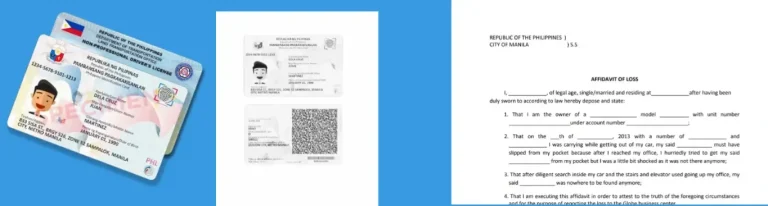
Affidavit of Loss
If your SIM is lost or stolen, this document is mandatory. You can get it from a notary public. It proves that your SIM was really lost.
Two Valid Government IDs
Examples include:
- Passport
- Driver’s License
- PhilHealth ID
- UMID
- Postal ID
Important reminder: IDs must not be expired.
The staff will photocopy them for records.
Step 2: Visit the Nearest Globe Store
Go to an authorized Globe Store. When you arrive:
- Go to the reception desk
- Inform them that your TM SIM was lost
- Request SIM replacement with same number
- Get a queue number
- Wait for your turn
When called, the staff will ask:
- Your mobile number
- If it is prepaid or postpaid
- Basic verification questions
Step 3: Fill Out Customer Modification Form
You will fill a request form. The form includes:
- Full name
- Mobile number
- Signature
- Verification details
Submit the form with:
- Affidavit of Loss
- Two valid IDs
Step 4: Verification Process
This step is very important. The Globe team will verify your identity. They may ask:
- When was the last time you used your SIM?
- How much was your last load?
- What promos did you activate?
- Who do you frequently call?
This process usually takes 30 minutes. After verification, they will issue your new SIM with the same number.
Step 5: Activation
Insert the new SIM into your phone.
- Your number remains the same.
- Your load remains.
- Your active promos remain.
Activation normally happens within a few minutes. In some cases, it may take up to 24 hours.
TM SIM Replacement via GlobeOne App

If you do not want to visit a store, you can use the GlobeOne App. This method is fast and can be done at home.
Step 1: Buy a New Replacement SIM
Before using the app, you must buy a new empty Globe SIM. You can purchase it from:
- Globe Store kiosks
- SM Supermalls
- Shopee Official Store
- Lazada Official Store
This SIM will not have any number yet.
Step 2: Open GlobeOne App
- Download and open the GlobeOne App.
- Login using your TM or Globe account.
Step 3: Navigate to SIM Services
Inside the app:
- Tap SIM Services
- Choose Replace SIM
- Confirm you are the owner
- Accept terms and conditions
Step 4: Insert the New SIM
Insert the new SIM into the same SIM slot where your old SIM was. This step helps the system recognize your device.
Step 5: Wait for Activation
After submitting the request:
- Your old number transfers to the new SIM
- You receive confirmation notification
Activation usually takes a few minutes.
Globe Store Replacement Charges
Charges depend on the reason.
| Reason | Postpaid | Prepaid / TM |
|---|---|---|
| New SIM | Free | ₱50 |
| Damaged | ₱99 | ₱50 |
| Lost or Stolen | Free | ₱50 |
| Upgrade to 5G | Free | ₱10 |
| Upgrade to eSIM | Free | ₱10 |
| Defective | Free | Free |
Fees may change anytime based on company policy.
GlobeOne App Charges
| Reason | Postpaid | Prepaid / TM |
|---|---|---|
| Damaged | Delivery fee | ₱10 + delivery |
| Upgrade to 5G | Delivery fee | ₱10 + delivery |
| Upgrade to eSIM | Free | ₱99 |
Payment Methods
Prepaid users can pay via:
- Credit card
- GCash
Postpaid users will see charges added to their monthly bill.
Read Also: TM SIM Rules For Prepaid And Postpaid Users
TM SIM Replacement For Minors
Follow these simple steps:
Step 1: Prepare the Documents
Collect these documents:
- Minor’s birth certificate
- Valid ID of parent or legal guardian
Make sure the documents are original and clear.

Step 2: Visit a TM or Globe Store
Go to the nearest TM or Globe store. The parent or legal guardian must go along with the minor’s documents.
Step 3: Request SIM Replacement
Tell the staff you want to replace the minor’s TM SIM card and keep the same number. They will check the documents and process your request.
Step 4: Activate the New SIM
After approval, you will receive a new SIM card. Insert the SIM and follow the activation instructions given by the store.
Read Also: TM Surf4All99 Promo
Important: Report Lost SIM to NTC
If your SIM was stolen, report to National Telecommunications Commission.
- They can block your device IMEI.
- This prevents misuse.
- Also call Globe helpline immediately.
Delivery Time For Replacement SIM
Delivery depends on your location.
- NCR area: 1 to 2 days
- Major cities: 3 to 5 days
- Remote areas: 7 to 10 days
If courier fails delivery three times, order is canceled.
Read Also: TM Combo 10 Promo
Who Can Apply for TM SIM Replacement?
Both prepaid and postpaid users are eligible. You can request replacement if:
- Your SIM is lost
- Your SIM was stolen
- Your SIM is damaged
- Your SIM expired
- Your SIM is not receiving signal
- You want to upgrade to LTE or 5G
- You are facing SIM registration problems
What Happens After Replacement?
Let’s clear common concerns.

- Your Old SIM: It becomes permanently deactivated.
- Your Number: Remains the same.
- Your Promos: Remain active until expiration.
- Linked Accounts: GCash, bank accounts, and online apps stay connected.
- Contacts: If saved in SIM, they remain.
Read also: TM AN20 Promos
Upgrade From Old 2G or 3G SIM
If your SIM is working but old, you can upgrade.
- Text: UPGRADE to 8080
Insert the new SIM within two minutes. Your number moves to the new LTE SIM.
Why Immediate Replacement Is Important
Your SIM is connected to:
- Bank OTP codes
- GCash wallet
- Credit cards
- Social media
- Email accounts
- Online shopping
If someone gains access, they can reset passwords. That is why fast action is important.
Read Also: How To Update TM SIM Registration Details Online
Common Reasons for SIM Card Replacement
A SIM card replacement may be required in several situations. Below are the most common reasons why customers request a new SIM card:
- Deactivated SIM: If your SIM card is no longer active or it has stopped receiving network signals, you may need a replacement. This usually happens when the number has been blocked or disconnected.
- Expired SIM: A SIM card can expire if it remains unused for a long period. When this happens, the network automatically deactivates it, and a new SIM is required to restore service.
- Lost SIM: If your SIM card is lost or stolen, it is important to request a replacement immediately to protect your number and personal information.
- Damaged SIM: A physically broken SIM card, or one that is not detected by your mobile phone, must be replaced to ensure proper connectivity and uninterrupted service.
- Upgrading to LTE or 5G SIM: If you are still using an older 3G SIM card, you may need to upgrade to an LTE or 5G-compatible SIM to access faster internet speeds and improved network performance.
- SIM Registration Issues: If your existing SIM fails to register properly or contains incorrect subscriber details, a replacement may be necessary to correct the records and ensure compliance with network requirements.
Important Things Of TM SIM Card Replacement
Here are the important things you should know about TM SIM replacement.
New TM SIM
- When you replace your TM SIM card, you will receive a new SIM.
- This new SIM supports 3G and 4G network connections.
- It also supports 5G network in areas where 5G service is available.
TM SIM Promos
All your previous TM SIM promos will remain active after the replacement. Your subscriptions and promo offers will continue until:
- Their expiry date ends, or
- The usage limit is fully consumed
There will be no interruption in your active promos.
Linked Accounts
All accounts linked to your mobile number will remain connected after SIM replacement. This includes:
- GCash accounts
- Bank accounts
- Credit cards
You do not need to relink or update your number after replacing the SIM.
Contacts
- All contacts saved on your SIM card will remain the same after replacement.
- There will be no changes to your saved numbers.
- Your TM SIM number will also remain unchanged.
Read Also: How To Pasaload In TM
FAQs About TM SIM Replacement With Same Number
Conclusion
TM SIM replacement with same number in 2026 is easy and secure. If your SIM is lost, stolen, damaged, or expired, you can replace it through a Globe Store or the GlobeOne App. Your old SIM will be permanently deactivated, but your number, load, promos, and linked accounts like GCash and bank apps will remain active. Proper documents such as valid IDs and an Affidavit of Loss may be required. Reporting stolen SIMs quickly helps prevent misuse and keeps your mobile identity safe.