How To Pasaload In TM 2027: Complete Guide To 143 Code, SMS, GlobeOne App, TM To Globe
How To Pasaload In TM 2027. Running out of mobile load can happen anytime, especially during important calls or urgent internet use. That is why TM Pasaload is very useful. It allows you to share part of your prepaid balance with friends or family in seconds.
In this guide, you will learn how to share a load in TM through *143#, how to pasaload through text message, and how to send a load from TM to Globe.
In this complete guide I will also explain how to use the GlobeOne app, how Smart pasaload works, and whether you can transfer loads between TM, Smart and TNT.


What Is Pasaload in TM?
Pasaload in TM is a prepaid service that allows you to send part of your mobile load to another person.
In simple words, it means sharing your load balance with someone who needs it.
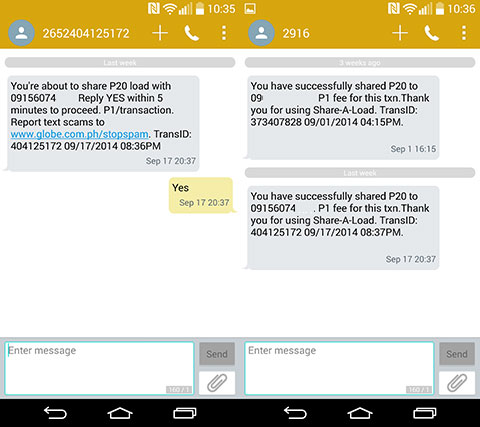
For example, if you have ₱100 load and your friend has no balance, you can send ₱20 to them. After sending, ₱21 will be deducted from your balance (₱20 load + ₱1 service fee). Your friend will receive ₱20 instantly.
Read Also: TM SurfBOOST15 Guide
Why Your TM Pasaload Is Not Working
If your TM pasaload is not going through, do not panic. This is a common issue, and most of the time, it can be fixed easily. There are several possible reasons why your transaction failed. Let’s look at them one by one.
Incorrect Recipient Number
TM pasaload only works for TM and Globe prepaid numbers. If you try sending load to DITO, Smart, or TNT, the transaction will automatically fail. Always double-check the mobile number before confirming. Make sure it starts with a valid TM or Globe prefix such as 0905, 0906, or 0917.
Insufficient Balance
Your balance must be enough to cover the load amount plus the ₱1 service fee. For example, if you want to send ₱50, you need at least ₱51 in your account. You can check your balance by dialing *143#, selecting TM Services, and choosing “Check Balance.”
Network or System Issues
Sometimes the TM system may experience delays or maintenance. This can temporarily stop pasaload transactions. If this happens, wait a few minutes, restart your phone, and try again. If the issue continues, you can use the TM Mobile App or GlobeOne App as an alternative method.
Daily Pasaload Limit Reached
TM usually allows pasaload transactions up to ₱150 per day. If you have already reached this limit, you will need to wait 24 hours before sending load again. You may also try sending a smaller amount if possible.
Recipient Is Using Postpaid
Pasaload only works for prepaid numbers. You cannot transfer load to a Globe postpaid account. Always confirm that the recipient is using a prepaid SIM before sending.
Expired or Inactive SIM
If either your TM SIM or the recipient’s SIM is expired, inactive, or not properly registered, the transaction will fail. Make sure both SIM cards are active and registered according to the SIM Registration rules.

How To Pasaload TM to Globe
If your friend or family member using Globe suddenly runs out of load, there is no need to worry. TM makes it very simple to send load directly from your phone. Since TM and Globe operate under the same network, transferring load between them is quick and smooth. You can send credits instantly using two easy methods: through the *143# menu or by using the GlobeOne app.
Using the *143# Code
This is the easiest offline method and works on any mobile phone. Follow these steps carefully:
- Open your phone’s dialer.
- Dial *143# and press call.
- From the menu, choose “Pass Load.”
- Select the “Share Load” option.
- Enter the recipient’s Globe mobile number correctly.
- Type the amount you want to send.
- Review the details, then tap “Confirm.”
Once the transaction is successful, you will receive a confirmation message. The amount will be deducted from your TM prepaid balance, and the Globe user will receive the load instantly.
Using the GlobeOne App
If you prefer a faster and more convenient online method, the GlobeOne app is a great option. Here’s how you can do it:
- Open the GlobeOne app on your smartphone.
- Log in using your TM number.
- Tap on “Buy Load” or “Share Load.”
- Enter the recipient’s Globe number and the amount you want to send.
- Double-check the details and press “Confirm.”
Within seconds, the load will reflect in the recipient’s balance. The GlobeOne app also allows you to monitor your load history, check available promos, and manage rewards. It serves as a complete digital tool for both TM and Globe users. If you experience any issues, you can contact TM customer service for assistance.
Read Also: TM Surf4All99 Promo
How To Share A Load in TM Through Text (SMS)
If you prefer texting, this method is very simple.
Format:
- Type: PASALOAD <space> MobileNumber <space> Amount
- Example: PASALOAD 09051234567 50
Now follow these steps:
- Open your Messages app.
- Type the format above.
- Send it to 808.
- Wait for confirmation message.
- Reply YES to confirm.
After confirmation, the load will transfer instantly.
Remember:
- Service fee is ₱1.
- Only works for TM and Globe prepaid numbers.
- Make sure you type the number correctly.

How To Pasaload TM To Globe Via Text
Since TM and Globe are in the same network, you can send load from TM to Globe easily.
- Use the same SMS method: PASALOAD <space> GlobeNumber <space> Amount
- Example: PASALOAD 09171234567 30
- Send to 808.
- Then reply YES to confirm.
Important:
- Globe number must be prepaid.
- Postpaid numbers cannot receive pasaload.
- Service fee ₱1 applies.
Read Also: TM EZ70 Promo Guide
How To Pasaload TM to TM
There are times when someone close to you suddenly runs out of mobile load. It could be a family member who needs to make an urgent call or a friend who needs internet access. In such situations, TM makes it very easy to help. With the TM Pasaload feature, you can instantly share part of your prepaid balance without going to any store. The whole process takes only a few seconds and can be done directly from your phone. Below are the different ways you can send load from TM to another TM number.
Using *143# Code
One of the most reliable ways to pasaload is through TM’s official USSD menu. This method works even without internet. Follow these steps carefully:
- Dial *143# on your TM mobile phone.
- Wait for the menu to appear on your screen.
- Select “TM Services” or “Send Load/Share-a-Load.”
- Choose the “Pasaload” option.
- Enter the recipient’s TM mobile number correctly.
- Type the amount you want to send, from ₱1 up to ₱150.
- Review the details and confirm the transaction.
After confirmation, you will receive a text message notifying you that the pasaload was successful. The recipient will also receive the load instantly.
Using SMS
If you prefer sending a simple text message, this method is quick and easy. Here’s how you can do it:
- Open your phone’s Messages app.
- Type the following format: PASALOAD <space> RecipientNumber <space> Amount Example: PASALOAD 09051234567 50
- Send this message to 808.
- Wait for a confirmation message from TM.
- Reply “YES” to proceed with the transaction.
Once you confirm, the load will be transferred instantly to the recipient’s TM number.
Using the TM Mobile Application
If you are using a smartphone, the TM mobile app makes load sharing even more convenient. Follow these steps:
- Open the TM app on your phone.
- Log in using your TM mobile number.
- Tap on “Send Load” or “Share Load.”
- Enter the recipient’s TM number.
- Input the amount you want to send.
- Double-check the details and confirm the transaction.
After confirmation, the recipient will receive the load within seconds.
Important Tips to Remember
Before sending load, keep these important points in mind:
- You can transfer between ₱1 and ₱150 per transaction.
- A ₱1 service fee is deducted from your remaining balance for every pasaload.
- Load sharing is only available for TM and Globe numbers. It does not work for other networks.
- The transferred amount is taken from your regular prepaid balance, not from promo credits or reward points.
- Make sure you have enough balance to cover both the load amount and the ₱1 service fee.
- Load is usually received instantly, but in rare cases, it may take a few minutes.
- After sending load, you can check your remaining balance using TM balance inquiry through *143#.

How to Transfer a Regular Load to Another Number
Sometimes a friend or family member runs out of load at the wrong time. The good news is that TM makes it easy to send your regular prepaid load to another TM or Globe number. You can choose an online method or an offline option, depending on what is more convenient for you. Below are the best and safest ways to transfer a regular load.
Using the GlobeOne App
If you have internet access, the GlobeOne App is one of the easiest methods.
Follow these simple steps:
- Open the GlobeOne App on your smartphone.
- Log in using your TM number.
- Tap on “Buy Load” or “Send Load.”
- Enter the recipient’s TM or Globe number.
- Choose the amount you want to send.
- Review the details carefully.
- Tap Confirm to complete the transaction.
Within seconds, the load will appear in the recipient’s account. Both you and the receiver will get a confirmation message. This method is perfect for users who manage multiple TM or Globe accounts in one place.
Using a TM Retailer SIM
If you are using a TM Retailer SIM, you can send load directly from your retailer wallet balance. This method is commonly used by small shop owners and load sellers.
Steps to follow:
- Type the amount you want to send.
- Press space and enter the recipient’s 10-digit mobile number.
Example: 50 09051234567
- Send the message to 2 + recipient’s number.
Example: 209051234567
After sending, the amount will be deducted from your retailer wallet, and the recipient will receive the load instantly.
Using the GCash App
Another fast and cashless way to send load is through the GCash App. This method is very convenient if you have Wi-Fi or mobile data.
Follow these steps:
- Open the GCash App on your phone.
- Tap the “Load” option on the home screen.
- Enter the recipient’s TM or Globe number.
- Select the load amount you want to send.
- Confirm the payment.
The load will be delivered instantly, and the amount will be deducted from your GCash balance. This method is simple, secure, and ideal for quick transactions.
Using *143# Code (No Internet Required)
If you do not have internet access, you can still transfer load using TM’s USSD code. This method works even on basic keypad phones.
Steps:
- Dial *143# on your TM phone.
- Select TM Services.
- Tap “Send Load” or “Share-a-Load.”
- Enter the recipient’s number.
- Enter the amount you want to send.
- Confirm the transaction.
The load will be transferred shortly after confirmation. This is one of the most reliable offline methods.
Important Things to Remember
Before transferring load, keep these important points in mind:
- You can only send load between TM and Globe numbers.
- A ₱1 service fee applies when using *143# or SMS.
- GlobeOne App and GCash transactions are free but require internet access.
- Always make sure you have enough balance to cover the load amount and service fee.
- Double-check the recipient’s number before confirming to avoid sending load to the wrong person.
By following these steps carefully, you can transfer regular load safely and easily anytime you need.
How to Share Load or Data in TM
TM makes it simple to share load with family and friends whenever they need it. If someone runs out of balance, you can quickly send regular load using your phone. While TM does not currently allow direct “Pasa MB” for mobile data, there are alternative options like Globe’s Surf4All promo that let you share internet data with others. Below is a clear and updated table to help you understand each method easily.
TM Load and Data Sharing Options
| ⚙️ Action | 📱 How to Do It | 📝 Notes |
|---|---|---|
| Share Load (₱1–₱500) | Dial *143# → Select TM → Choose “Share a Load/Promo/MB” → Follow on-screen steps | Works for TM to TM and TM to Globe numbers |
| Share Data (MB) | Direct “Pasa MB” is not available | Use Globe’s Surf4All promo to share data instead |
| Join Surf4All | Register via GlobeOne app or text SURF4ALL99 to 8080 | Get 9GB shared data valid for 7 days |
| Add TM Friends to Share | Open GlobeOne app → Add TM numbers to your Surf4All group | All members can use the shared data pool |
| Check Balance or Data | Dial *143# → Select TM → Tap “Check Balance” | View your remaining load and data instantly |
Read Also: Fastest TM APN Setting
Benefits of the PASALOAD Feature
✅ Simple and Convenient
If someone close to you suddenly runs out of load and needs to stay in touch, PASALOAD makes it very easy to help. You can transfer load in just a few quick steps using your phone. The process takes only seconds, and the recipient receives the load almost immediately. It is designed to be fast and user-friendly for everyone.
✅ Instant Delivery
After sending a PASALOAD, the transfer is usually completed right away, as long as both users have a stable mobile signal. No matter the time of day, the load is delivered quickly so communication is not interrupted.
✅ Affordable Service Fee

PASALOAD for Smart users costs only ₱1 per transaction, making it a low-cost option for helping others. However, if you plan to send load many times, using a direct top-up service like Ding may be more cost-effective since it does not charge transaction fees.
Read Also: Best TM Promos
FAQs About TM Pasaload Guide
Conclusion
TM Pasaload makes it easy to share load anytime. You can send load using *143#, SMS to 808, the GlobeOne app, or GCash. It works for TM to TM and TM to Globe prepaid numbers. A ₱1 service fee applies for SMS and *143# transfers. Always check your balance, confirm the correct number, and make sure both SIMs are active. Direct transfers to Smart or TNT are not supported, but GCash can help.