How To Deactivate TM SIM Card Online 2027: Complete Guide For Beginner
How To Deactivate TM SIM Card Online. Deactivating a SIM card is something many people need at some point. Whether your phone is lost, you are switching to a new number, or you simply don’t need your SIM anymore, it is important to deactivate it properly.
If you are using a TM SIM, the good news is that the process is simple, quick, and mostly free. In this detailed guide, you will learn how to deactivate TM SIM card online, along with other easy methods you can use anytime.

TM SIM Deactivation Overview
Before starting, let’s quickly understand the basic details of TM SIM deactivation.
| Item | Details |
|---|---|
| Deactivation Methods | Online, App, Helpline, Store Visit |
| Cost | Free |
| Documents Required | Valid ID & SIM Ownership |
| Time Required | Instant to 24 hours |
| Reactivation | Not possible |
| Data Retention | Some data may be saved by TM |
| Important Step | Backup contacts & balance |
Important Note: Once your TM SIM is deactivated, you cannot reactivate it again. You will need to buy a new SIM.
Read Also: How To Transfer Or Convert TM Load To GCash
Why You May Need To Deactivate TM SIM Card
There are many reasons why people deactivate their SIM cards. Below are the most common ones:
1. Phone Lost or Stolen
If your phone is lost or stolen, your SIM card can be misused. Someone can use your number for illegal activities. That’s why you should deactivate it immediately.
2. Switching to Another Network
Many users change networks for better packages or signals. In this case, the old SIM is no longer needed.
3. SIM Replacement
Sometimes SIM cards stop working properly. Users then buy a new SIM and deactivate the old one.

4. Too Many SIM Cards
If you have multiple SIMs and don’t use them, it is better to deactivate unused ones.
5. Personal Reasons
Some people want privacy or want to avoid unwanted calls. Deactivating the SIM helps in such cases.
How To Deactivate TM SIM Card Online
Now let’s come to the main topic. There are four simple methods to deactivate your TM SIM card. You can choose any method that is easy for you.
Via Customer Helpline
This is one of the easiest ways to deactivate your SIM.
Steps:
- Dial *808 or 808# from your TM SIM
- Wait for the customer support response
- Provide your details:
- Name
- ID card number
- SIM number
- Tell them you want to deactivate your SIM
- Give a valid reason
- Submit your request
Your SIM will be deactivated within 24 hours.
Tip: If your SIM is still active after 24 hours, contact support again.
Visit Nearest Store
If you want quick results, this is the best option.
What You Need:
- Valid ID card
- SIM ownership proof
Steps:
- Visit the nearest TM/Globe store
- Request SIM deactivation
- Submit your documents
- Verification will be done
- SIM will be deactivated within minutes

Online Using App
This is the best online method to deactivate your TM SIM.
Steps:
- Open the GlobeOne App
- Login to your account
- Go to the Support Section
- Click on SIM Deactivation
- Enter required details
- Follow on-screen instructions
- Submit your request
After verification, your SIM will be deactivated.
Using NTC Website
If your SIM is lost, this method is very important.
Steps:
- Open your browser and go to the official NTC website.
- Find and open the complaint form on the website.
- Enter your username or full name in the form.
- Upload required documents like ID, student card, or birth certificate.

- Enter your lost SIM number and a valid email address.
- Write a short complaint message about your issue.
- Click the Submit button after checking all details.
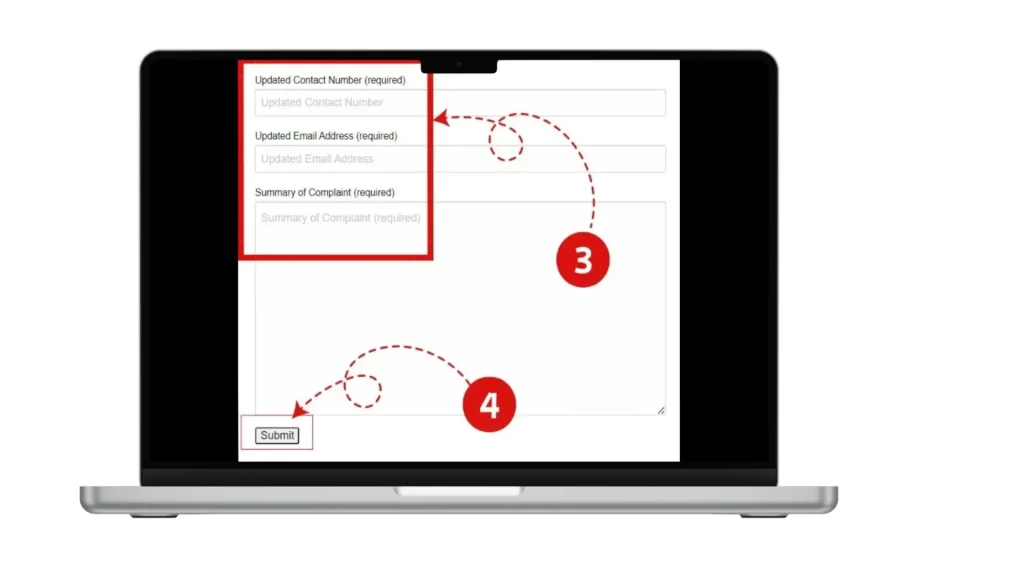
- Wait for confirmation message or email.
Result:
You will receive confirmation and your SIM will be deactivated.
Read Also: TM EZ70 Promo Guide
How To Deactivate TM SIM For Minors
If the SIM is registered under a minor’s name, follow these steps:
Required Documents:
- Parent/Guardian ID
- SIM ownership proof
- Minor details
Steps:
- Visit store / use app / helpline
- Provide required documents
- Submit request
- Wait for verification
- SIM will be deactivated
Confirmation will be sent via SMS or email.

Important Precautions Before Deactivating TM SIM
Before you deactivate your SIM, make sure you follow these important steps:
1. Backup Your Contacts
Save all your important contacts. Once SIM is deactivated, contacts may be lost.
2. Transfer Balance
Use or transfer your remaining balance before deactivation.
3. Update Linked Accounts
Many apps use your number for OTP (like WhatsApp, banking, etc.). Update them before deactivation.
4. Pay All Bills
If you have any pending bills, clear them first.
5. Inform Your Contacts
Tell your friends and family about your new number.
Read Also: TM SIM PUK Code
What Happens After TM SIM Deactivation?
Here are some important things you should know:
- Your SIM will stop working completely
- You cannot make calls or send messages
- Your number may be recycled
- Reactivation is not possible
- You will need a new SIM

Online vs Offline SIM Deactivation – Which Is Better?
| Method | Speed | Convenience | Best For |
|---|---|---|---|
| App (Online) | Fast | Very Easy | Home users |
| Helpline | Medium | Easy | Quick requests |
| Store Visit | Very Fast | Physical visit needed | Urgent cases |
| NTC Website | Medium | Online | Lost SIM |
Best Choice: Online app method (easy + fast)
Read Also: TM Surf4All99 Promo
Common Mistakes To Avoid
Avoid these mistakes while deactivating your SIM:
- Not backing up contacts
- Forgetting linked accounts
- Providing wrong information
- Not clearing bills
- Delaying deactivation after SIM loss
Benefits of Deactivating Unused SIM
- Prevents misuse
- Protects your identity
- Avoids unnecessary charges
- Keeps your digital life secure
Read Also: TM Surf4All99 Promo
FAQs About TM SIM Deactivation
Yes, you can easily deactivate your TM SIM card online using the GlobeOne app or by submitting a request through official support channels. The online method is simple and allows you to complete the process without visiting a store. You just need to log in, provide your details, and follow the instructions.
Yes, TM SIM deactivation is completely free. You do not need to pay any charges for deactivating your SIM card. However, make sure that you clear any pending balance or bills before starting the deactivation process.
The deactivation process is usually quick. In most cases, your SIM is deactivated instantly or within a few hours. However, in some situations, it may take up to 24 hours depending on the method used and verification process.
No, once your TM SIM card is deactivated, it cannot be reactivated. If you want to use the service again, you will need to purchase a new SIM card with a new number.
If your SIM card is lost or stolen, you should deactivate it immediately to prevent misuse. You can use the NTC website, helpline, or visit a store to report the issue and request deactivation. Acting quickly can help you avoid any serious problems.
Yes, in most cases, you will need a valid ID and proof of SIM ownership. These documents are required to verify your identity and ensure that only the rightful owner can deactivate the SIM card.
Yes, if your contacts are saved on the SIM card, they may be lost after deactivation. That’s why it is very important to back up all your contacts and important data before deactivating your SIM.
No, you cannot deactivate someone else’s SIM card unless you have proper authorization. In case of minors, a parent or guardian can request deactivation by providing the required documents.
After deactivation, your number becomes inactive and may be recycled by the company after some time. This means the same number could be assigned to another user in the future.
Yes, if a TM SIM card is not used or reloaded for a long period (usually around 120 days), it may be automatically deactivated by the network. To avoid this, make sure to keep your SIM active if you plan to use it later.
Conclusion
Deactivating a TM SIM card is simple and quick. You can do it online using the GlobeOne app, by calling customer support (808), visiting a store, or using the NTC website for lost SIMs. The process is free and usually takes up to 24 hours. Before deactivation, backup your contacts, transfer balance, and update linked accounts. Once deactivated, the SIM cannot be reactivated, so you will need a new SIM if needed later.