TM SIM PUK Code 2026: Complete Guide To Recover TM PUK Code Easily
TM SIM PUK Code. Many TM users face a problem where their SIM card becomes locked after entering the wrong PIN code several times. When this happens, the phone asks for a PUK code to unlock the SIM. Without the correct code, calls, messages, and mobile data cannot be used. Because of this, many users search for solutions like TM SIM PUK code unlock or TM SIM PUK code generator to restore their service quickly.
The good news is that unlocking a TM SIM is possible through several official methods. You can retrieve the PUK code from the SIM card pack, contact TM Tambayan on Facebook Messenger, call the customer support helpline, visit a service center, or use the GlobeOne app. This guide explains all methods step by step.
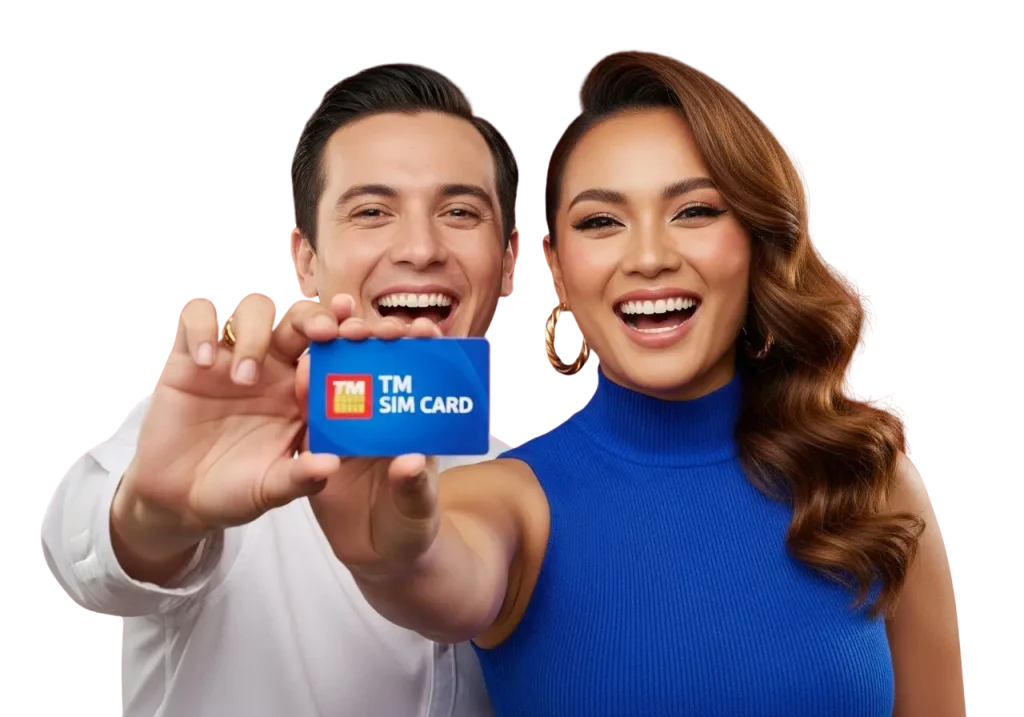
What IS TM SIM PUK Code
A PUK code stands for Personal Unblocking Key. It is a special security code that is used to unlock a SIM card after it becomes blocked. Every SIM card has two important security codes.
• PIN Code (Personal Identification Number)
• PUK Code (Personal Unblocking Key)
The PIN code protects your SIM card from unauthorized use. If someone enters the wrong PIN three times, the SIM automatically locks itself.
When the SIM becomes locked, the phone asks for a PUK code. This code allows the user to reset the PIN and unlock the SIM card. Normally, the PUK code is printed on the SIM card packaging or stored in the telecom provider’s system.
Read Also: How To Change TM SIM Registration Information
Why TM SIM Card Gets Locked
A SIM card does not lock without reason. Usually the problem occurs because of repeated incorrect PIN attempts. Below are the most common reasons.
Multiple Incorrect PIN Attempts
A SIM card allows only three attempts for entering the correct PIN. If all attempts fail, the SIM automatically blocks itself.
Forgotten SIM PIN
Many users set a PIN code but forget it later. When they try random numbers, the SIM becomes locked.
Phone Security Settings
Some smartphones have additional SIM security settings. Entering the wrong code repeatedly can lock the SIM.

Children or Friends Using the Phone
Sometimes someone else uses the phone and enters random PIN numbers. This also leads to SIM blocking. When the SIM becomes blocked, the phone screen will show a message asking for the PUK code.
TM SIM PUK Code Generator – Important Truth
Many websites claim to offer a TM SIM PUK code generator. These tools promise to create a PUK code instantly. However, users should understand an important fact.
- The PUK code cannot be generated online.
- Every SIM card has a unique PUK code stored in the telecom company’s database. Only the network provider can access that code.
- Because of this, any website claiming to generate a PUK code is usually unreliable.
- The safest way to retrieve your PUK code is through official TM or Globe support methods.
Methods to Get TM SIM PUK Code
If your SIM card is locked, do not panic. There are several simple ways to retrieve the PUK code. Below are the most reliable methods.
- Via SIM Card Pack or Bag
- Via TM Tambayan Facebook Messenger
- Via Customer Service Center
- By Calling Customer Support Helpline
- Via GlobeOne App
Each method is explained below in detail.
Via SIM Card Pack
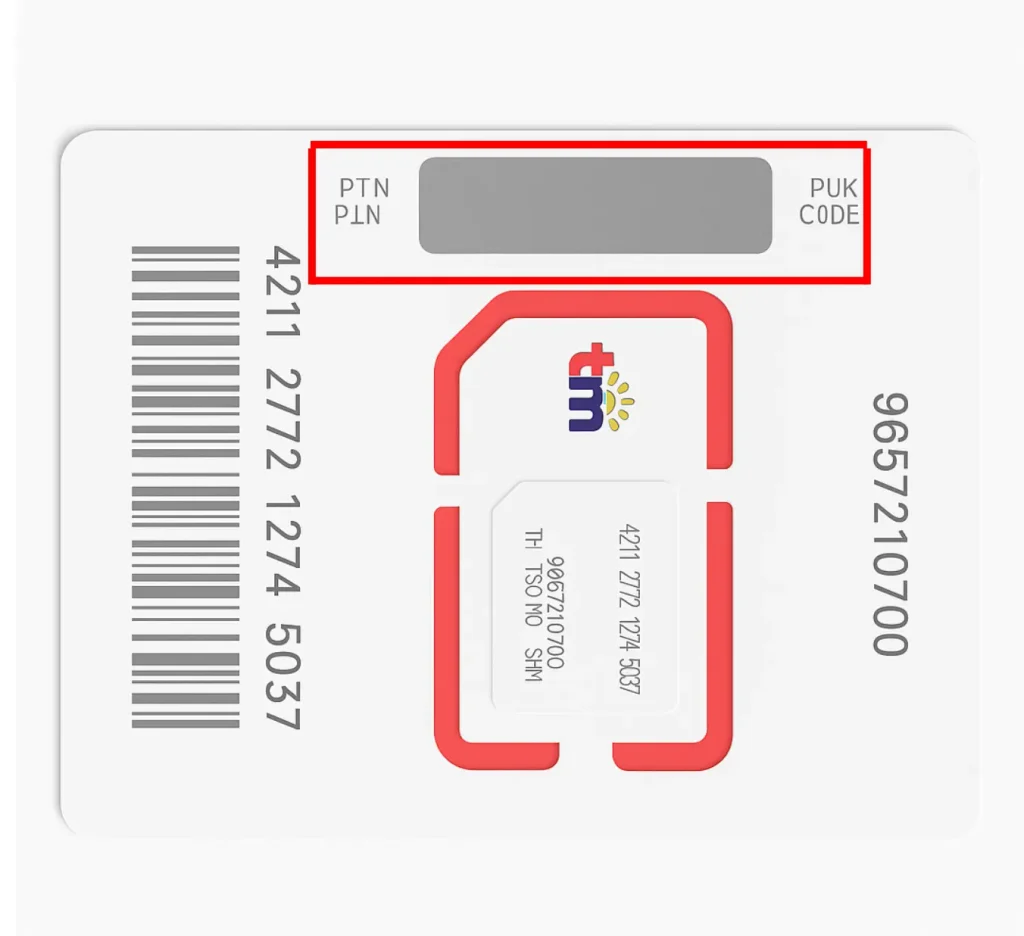
The easiest way to find your PUK code is by checking the original SIM card packaging. When you buy a new SIM card, it usually comes inside a plastic card or pack. This pack contains important information such as the PIN and PUK codes.
Steps to Get PUK Code from SIM Pack
- Locate your original TM SIM card packaging.
- Look for the silver scratch panel on the plastic card.
- Scratch the panel carefully using a coin.
- The PUK code will appear under the silver layer.
- Enter the code on your phone when asked.
Many SIM packs also include a guidance booklet. Sometimes the PUK code can also be found inside that booklet.
If you still have the SIM pack, this is the fastest and easiest solution.
Via TM Tambayan Facebook Messenger
Another simple method is contacting TM Tambayan through Facebook Messenger. TM provides customer support through its official Facebook page.
Steps to Retrieve PUK Code via Messenger
- Open Facebook on your phone or computer.
- Search for TM Tambayan.
- Open the official page.
- Click on the Message button.
- Send a message explaining that your SIM card is locked.
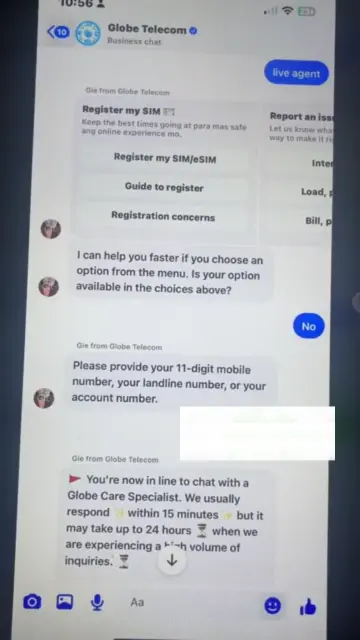
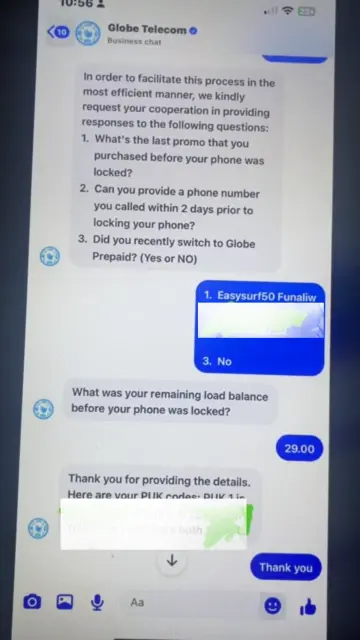
At first, you will be connected with an AI support assistant.

Type “live agent” in the chat to speak with a real customer support representative. The system will ask for your mobile number and then connect you to a support agent.
Verification Questions
The live agent may ask some questions to confirm your identity. For example:
• What was the last promo you purchased before your phone locked?
• Can you provide a phone number you called recently?
• Did you recently switch to Globe prepaid?
Once you answer the questions correctly, the support agent will provide your TM SIM PUK code.
Via Customer Service Center
If you cannot retrieve your PUK code online, you can visit the nearest TM customer service center. Customer service centers provide direct assistance for SIM related issues.
Steps to Get PUK Code from Service Center
- Search online for the nearest TM service center.
- Visit the center during working hours.
- Inform the service agent that your SIM card is locked.
- Provide your mobile number and identification.
The agent will verify your identity and then provide your PUK code.
What to Bring with You
Before visiting the service center, make sure you bring the following items.
• A valid government issued ID (passport, national ID, or driving license)
• Your mobile number
• Any proof of SIM ownership
• Recent load receipts if available
After verification, the service agent will provide your PUK code.
By Calling Customer Support
Another effective way to retrieve your PUK code is by calling the TM customer support helpline. Customer support agents can quickly help users unlock their SIM cards.
TM Customer Support Numbers
• (02) 7730 1500
• 808 (for TM users)
Steps to Retrieve PUK Code via Call
- Dial the TM customer service number.
- Select the option to speak with a support representative.
- Tell the agent that your SIM card is locked.
- Provide your mobile number.
- Answer verification questions.
Once the verification process is complete, the support agent will give you your PUK code.

Via GlobeOne App
The GlobeOne App is another useful tool for TM and Globe SIM users. This app allows users to manage their accounts and retrieve important information.
Steps to Find PUK Code Using GlobeOne App
- Open the GlobeOne App on your phone.
- Log in using your mobile number.
- Go to the Accounts section.
- Select your mobile number.
- Tap on Help or Account Details.
- Look for the PUK code option.
The app will display your PUK code on the screen.
- Enter the code on your phone to unlock your SIM card.
If the code does not appear, you can contact TM or Globe support through the app’s help section.

Visit the TM Physical Store
If the PUK code is not available online, follow these simple steps:
- Visit the nearest TM physical store.
- Explain your SIM issue to the store staff.
- Complete the required verification process.
- Receive your PUK code from the staff.
- Use the PUK code to reset your SIM PIN.
If the issue is still not resolved, you can request a SIM replacement with the same number.
If you are facing other TM SIM issues such as activation problems, an expired or invalid SIM, inactive SIM after setup, blocked SIM, incorrect information errors, network issues, or signal connectivity problems, you can check the complete guide to resolve them.

Read Also: How To Transfer Or Convert TM Load To GCash
How To Unlock TM SIM Card Using PUK Code
After retrieving the PUK code, the next step is unlocking your SIM card. Follow these steps carefully.
Steps to Unlock TM SIM
- Insert the locked TM SIM card into your phone.
- Turn on the phone.
- The phone screen will ask for the PUK code.
- Enter the PUK code carefully.
- After entering the code, create a new 4 digit PIN.
- Re enter the PIN to confirm.
Once the process is complete, your SIM card will be unlocked and ready for use.
Important Things to Remember When Entering PUK Code
Users must be careful while entering the PUK code.

• Always enter the correct code.
• Avoid guessing random codes.
• Too many wrong attempts can permanently block the SIM.
• Write down your new PIN and keep it safe.
If the PUK code is entered incorrectly multiple times, the SIM card may become permanently unusable.
Read Also: TM Surf4All99 Promo
What to Do If You Cannot Retrieve the PUK Code
Sometimes users cannot access their SIM pack and cannot contact customer support.
- In this situation, the last solution is SIM replacement.
- You can visit the nearest TM service center and request a SIM replacement with the same number.
After verification, the company will provide a new SIM card with your existing number. This process usually takes a short time and helps restore your mobile services.
Common Problems TM SIM Users Face
Many users face different issues when their TM SIM becomes locked. Below are some common problems.
- SIM Blocked After Wrong PIN: Most users enter the wrong PIN several times. After three attempts, the SIM becomes locked and asks for a PUK code.
- Lost SIM Card Packaging: Many people throw away the SIM pack after activation. Later they cannot find the PUK code when the SIM gets locked.
- PUK Code Entered Incorrectly: Sometimes users guess the PUK code. Too many wrong attempts can permanently block the SIM card.
- No Access to Customer Support: Some users cannot contact support quickly. This delay makes the unlocking process longer.
- GlobeOne App Login Problem: Users sometimes forget their app login details, so they cannot check their PUK code inside the app.
Tips To Avoid TM SIM Lock Issues
- Save Your SIM Packaging: Always keep the SIM card pack in a safe place. It contains your PIN and PUK codes.
- Write Down Your PIN Code: If you change your SIM PIN, write it somewhere safe so you do not forget it.
- Avoid Guessing the PUK Code: Never enter random PUK codes. Too many attempts can permanently disable your SIM.
- Register Your SIM Card: A registered SIM is easier to recover because customer support can verify your identity quickly.
- Contact Official Support Only: Always use official TM support channels like the helpline, Messenger, or service center.
Read Also: Stop Spam & Scam Texts On TM SIM
FAQs About TM SIM PUK Code
Conclusion
A locked TM SIM card can be frustrating, but the problem is usually easy to solve if you know the right steps. When the SIM becomes blocked after several wrong PIN attempts, the PUK code is required to unlock it. Users can retrieve this code through several official methods such as checking the SIM card pack, contacting TM Tambayan on Facebook Messenger, calling the customer service helpline, using the GlobeOne app, or visiting a TM service center. By carefully following these methods and entering the correct PUK code, you can quickly unlock your SIM and continue using your mobile services without further issues.