TM SIM Roaming 2026: Complete Guide To Online Activation, Rates And Promos
TM SIM Roaming 2026. If you are traveling outside the Philippines and still want to stay connected with your family, friends, and important services using your TM SIM, then TM Roaming is the solution that makes it possible. With this service, your same TM number continues to work in many countries around the world by connecting to partner networks, so you don’t need to buy a new SIM card every time you travel. It allows you to make and receive calls, send and receive SMS, and even access mobile data through roaming promos, while keeping your original number active for OTPs, banking alerts, and important messages.
TM roaming is designed to make international travel easier and more convenient, ensuring that you stay connected anytime and anywhere, whether you are in Asia, the Middle East, Europe, Africa, or America.
What Is TM SIM Roaming?
TM Data Roaming is a service that allows you to use your TM SIM card while traveling outside the Philippines. It keeps you connected to your family, friends, and online apps even when you are abroad.
Once activated, you can:
- Use mobile data abroad
- Send and receive SMS
- Make calls and receive calls
- Stay connected to apps like WhatsApp, Messenger, and banking apps
- Receive OTPs for important transactions
No need to buy a foreign SIM card. Your TM number stays active everywhere you go.
Read Also: Best TM Promos
Why TM Roaming Is Important for Travelers
TM roaming is not just a feature; it is a necessity for many travelers, especially OFWs, students, and tourists. Here is why it matters:
1. Stay Connected Anywhere
You can keep using your same number in different countries without interruption.
2. Receive Important Messages
Bank OTPs, verification codes, and emergency SMS messages still come to your SIM.
3. Easy Communication
You can call or text your family anytime.
4. No Need for Foreign SIM
You don’t need to search for or buy a new SIM in every country.
5. Automatic Reconnection
Once you return home, your SIM automatically reconnects to the local network.
How To Activate TM SIM Roaming
Before you travel outside the Philippines, it is very important to activate TM SIM roaming in advance. This ensures your SIM works smoothly abroad for calls, texts, and mobile data. Even a small mistake before departure can cause network issues in another country, so always set it up early.
Here are the easiest and safest ways to activate TM roaming:
Method 1: USSD Code Activation
This is one of the fastest ways to turn on roaming without any app.
Steps:
- Dial *143# on your TM SIM
- Press the call button
- Go to Roaming & International
- Select Activate Roaming
- Wait for confirmation message
Once confirmed, your roaming service will be activated.

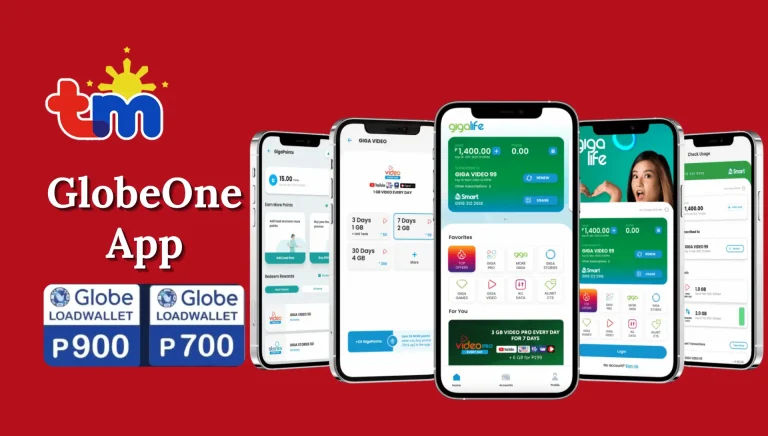
Method 2: GlobeOne App
You can also activate roaming using the official GlobeOne app.
Steps:
- Open the GlobeOne App
- Log in using your TM number
- Go to Roaming Services
- Turn ON the TM Roaming toggle
- Wait for confirmation
This method is very simple and can be done anytime.
Method 3: SMS Activation
This is the most popular method for prepaid users because it is quick and does not require an app.
Steps:
- Make sure your TM SIM has at least ₱100 load balance
- Open your Messages app
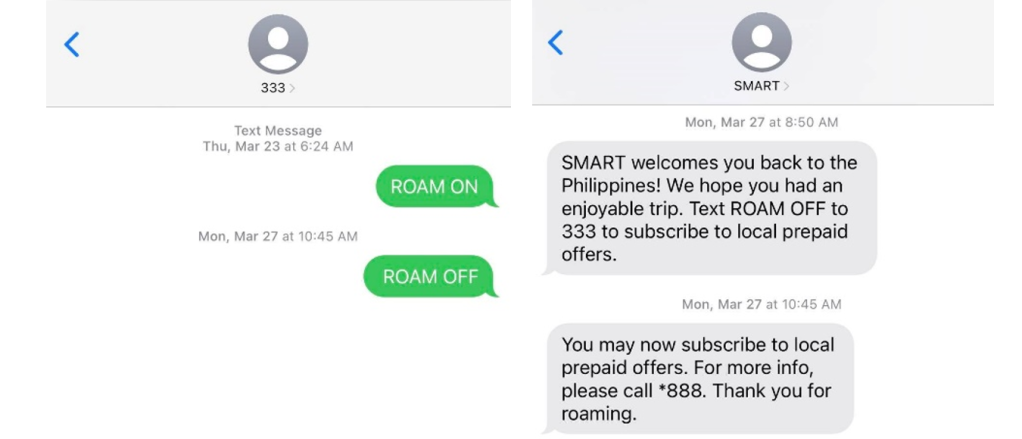
- Type: ROAM ON
- Send it to 8080
- Wait for confirmation SMS from TM
- Restart your phone before flying or after landing
After restart, your phone will automatically connect to a partner network abroad.
Method 4: Customer Support Activation
If you face any issue, you can also activate roaming through support.
Steps:
- Dial 211 using your TM SIM
- Or visit a nearby Globe Store
- Request the agent to activate roaming for your number
They will enable roaming for you manually.
Important Reminder Before Travel
- Always activate TM roaming at least 24 hours before your flight
- Make sure your SIM is active and has enough load
- Restart your phone after activation for proper setup
- This ensures your TM number works without interruption abroad
Read Also: Fastest TM APN Setting
How to Use TM Roaming Abroad
Here is the simple guide to start using TM roaming when you travel:
Step 1: Activate Roaming Before Travel
Make sure roaming is activated in the Philippines before your flight.
Step 2: Turn On Mobile Data
After arriving abroad:
- Turn ON mobile data
- Enable Data Roaming in settings
Step 3: Register a Roaming Promo
Use any of these methods:
Via GlobeOne App:
- Open GlobeOne
- Go to “Shop”
- Select “Pang Abroad” promos
Via GCash:
- Open GCash
- Select TM brand
- Go to “Roaming & International”
Step 4: Set APN Settings
Make sure APN is:
Step 5: Restart Your Phone
Restart device to connect to partner network.
TM Easy Plan 150 Promo Details
How to Make Calls or Send Texts While Abroad (TM Roaming)
| Action | How to Dial or Send | Example |
|---|---|---|
| Call | Dial + (country code) (area code) (mobile/landline number) | +639151234567 |
| Text | Send message using + (country code) (area code) (mobile/landline number) | +639151234567 |

TM Easy Plan 150 Promo Details
TM Roaming Call & Text Rates
| Action | Asia & America Rates | Europe & Africa Rates |
|---|---|---|
| Outgoing Call | ₱120 per minute | ₱150 per minute |
| Incoming Call | ₱60 per minute | ₱75 per minute |
| Outgoing Text | ₱20 per 160 characters | ₱25 per 160 characters |
| Incoming Text | FREE | FREE |
Note: Charges may vary depending on country and network.
Read Also: How To Redeem Points In TM
TM Roaming Internet Promos (GoRoam & Roam Surf)
To reduce costs, TM offers affordable roaming packages.
GoRoam – Budget Friendly Internet Abroad
TM GoRoam makes roaming cheaper and easier without switching SIM cards.
Asia Offers
- Hong Kong: 1GB (₱300 / 7 days)
- Thailand: 10GB (₱600 / 30 days)
- Indonesia: 25GB (₱600 / 30 days)
- Singapore: 10GB (₱1,000 / 30 days)
USA & Canada
- USA: 10GB (₱1,500 / 30 days)
- Canada: 15GB (₱2,000 / 30 days)
Europe
- UK: 10GB (₱1,100 / 30 days)
- France: 20GB (₱1,300 / 30 days)
- Italy: 10GB (₱1,200 / 30 days)
Middle East
- UAE: 10GB (₱1,000 / 30 days)
- Saudi Arabia: 5GB (₱1,000 / 30 days)
- Kuwait: 5GB (₱800 / 30 days)
Roam Surf Long Stay Offers
For longer travel, TM offers affordable bundles:
- Roam Surf 999 → 3GB (5 days)
- Roam Surf 1599 → 5GB (10 days)
- Roam Surf 2199 → 7GB (15 days)
- Roam Surf 3199 → 10GB (30 days)
- Roam Surf 4299 → 15GB (30 days)
Perfect for tourists and OFWs staying abroad longer.
Roam Surf4All – Shareable Internet
Traveling with family or friends? This is for you.
- Share data with group
- No pocket WiFi needed
- Budget-friendly per person
Example Plans
- 10GB (5 days) – ₱1,999
- 15GB (10 days) – ₱3,399
- 20GB (30 days) – ₱4,999
TM Roam Kabayan Packs (For OFWs)
Special roaming bundles for overseas workers:
| Package | Data | Calls | SMS | Validity |
|---|---|---|---|---|
| Lite | 1GB | 100 mins | 10 SMS | 15 days |
| Plus | 3GB | 300 mins | 30 SMS | 30 days |
| All-in | 6GB | 600 mins | 60 SMS | 30 days |
Available in Saudi Arabia, UAE, Kuwait, Japan, Singapore, Hong Kong, and more.
Roam Facebook Offers
For light social media use:
- 100MB (1 day) – ₱100
- 300MB (3 days) – ₱300
- 500MB (5 days) – ₱500
Perfect for Facebook, Messenger, and GCash usage.
Countries Where TM Roaming Works
TM roaming works in many regions around the world.
Asia & Middle East
Examples include:
Australia, Cambodia, Macau, Thailand, UAE, Qatar, Saudi Arabia, New Zealand, Guyana, Hong Kong, India, Indonesia, Israel, Japan, Oman, Kuwait, Afghanistan, Lebanon, Malaysia, Myanmar, Papua New Guinea, Singapore, South Korea, Tajikistan, Vietnam
Europe
Examples include:
Austria, Germany, Netherlands, Kazakhstan, Belgium, Switzerland, Hungary, Greece,
America
Examples include:
Canada, USA, Montserrat, St. Vincent and the Grenadines, Dominican Republic, Guatemala, Uruguay, Guyana,
Africa
Examples include:
Central African Republic, Italy, Turkey, Egypt, Morocco, Kenya, Mozambique, Nigeria, Zimbabwe, Equatorial Guinea, Spain, Mauritius

Read Also: TM SIM Rules For Prepaid And Postpaid Users
Limited and Special Network Conditions
Some countries may have:
- Limited roaming services (SMS only or incoming calls only)
- No 2G or 3G support on some networks
- Temporary service restrictions in certain regions
So always check compatibility before traveling.
TM Roaming Network Compatibility (2G & 3G Networks)
Countries Where 2G Roaming Is Not Available
| Country | Network Operator | 2G Decommission Date |
|---|---|---|
| Cayman Islands | Digicel Cayman Ltd. | — |
| Guam | PTI / IT&E | — |
| Hong Kong | Hutchison | — |
| Macau | 3Macau | — |
| Mexico | Telefónica | — |
| Netherlands | T-Mobile | — |
| Northern Marianas | IT&E | — |
| Puerto Rico | Claro | — |
| Singapore | MobileOne / Singtel / StarHub | — |
| Switzerland | Sunrise Communications | 31 Dec 2022 |
| Taiwan | Chunghwa / Taiwan Mobile / Far EasTone | — |
| USA | AT&T | — |
Countries Where 3G Roaming Is Not Available
| Country | Network Operator | 3G Shutdown / Decommission |
|---|---|---|
| Australia | Telstra | — |
| Bahrain | Zain | — |
| Cambodia | Smart Axiata | — |
| Czech Republic | O2 / T-Mobile / Vodafone | — |
| Germany | Telefónica | — |
| Greece | Cosmote | — |
| Greece | Vodafone | Dec 2022 |
| Hungary | Vodafone | Apr – Nov 2022 |
| Indonesia | XL Axiata / Telkomsel Indonesia | — |
| Ireland | Vodafone | 31 Dec 2023 |
| Italy | TIM | — |
| Lithuania | Telia | Sep 2022 |
| Macedonia | Makedonski Telecom | 31 Dec 2022 |
| Malaysia | Celcom / Digi / Maxis / U Mobile | — |
| Netherlands | Vodafone / KPN | — |
| Norway | Telenor | — |
| Puerto Rico | Claro | Q4 2023 |
| Romania | Telekom Romania | — |
| Taiwan | Far EasTone / Chunghwa Telecom | Jun 2024 |
| USA | AT&T | — |
| Vietnam | Viettel | — |
Read Also: How To Activate TM SIM Card
TM SIM Roaming Availability Status
Temporarily Deactivated Roaming Service
In these countries, TM SIM roaming is currently not working or fully disabled.
| Country List |
|---|
| Pakistan |
| Swaziland |
| Benin |
| Burundi |
| Gambia |
| Mongolia |
| Mozambique |
Limited Roaming Service (Text & Incoming Calls Only)
In these countries, you can:
- Receive SMS
- Receive calls
- Cannot make outgoing calls
- Limited or no data services
Asia & Middle East (Limited Roaming)
| Countries |
|---|
| Azerbaijan |
| Bahrain |
| Bangladesh |
| Bhutan |
| Brunei |
| China |
| Fiji |
| Guam |
| Guinea |
| Iran |
| Iraq |
| Jordan |
| Maldives |
| Micronesia |
| Mongolia |
| Nauru |
| Nepal |
| Palestine |
| Saipan |
| Sri Lanka |
| Taiwan |
| Uzbekistan |
| Yemen |
America (Limited Roaming)
| Countries |
|---|
| Argentina |
| Barbados |
| Bermuda |
| Bolivia |
| Brazil |
| Chile |
| Colombia |
| Costa Rica |
| Cuba |
| Dominica |
| Dominican Republic |
| Ecuador |
| Greenland |
| Grenada |
| Haiti |
| Honduras |
| Jamaica |
| Mexico |
| Nicaragua |
| Panama |
| Paraguay |
| Peru |
| Puerto Rico |
| Venezuela |
Europe (Limited Roaming)
| Countries |
|---|
| Albania |
| Armenia |
| Belarus |
| Belgium |
| Bulgaria |
| Denmark |
| Estonia |
| Faroe Islands |
| Finland |
| France |
| Georgia |
| Gibraltar |
| Guernsey |
| Iceland |
| Ireland |
| Isle of Man |
| Jersey |
| Latvia |
| Liechtenstein |
| Lithuania |
| North Macedonia |
| Malta |
| Moldova |
| Norway |
| Poland |
| Portugal |
| Romania |
| Russia |
| San Marino |
| Serbia |
| Slovakia |
| Slovenia |
| Sweden |
| Switzerland |
| Ukraine |
| United Kingdom |
Africa (Limited Roaming)
| Countries |
|---|
| Algeria |
| Andorra |
| Angola |
| Benin |
| Bosnia |
| Botswana |
| Burkina Faso |
| Burundi |
| Cameroon |
| Cape Verde |
| Central African Republic |
| Ethiopia |
| Gabon |
| Ghana |
| Guinea |
| Guinea-Bissau |
| Kenya |
| Lesotho |
| Liberia |
| Libya |
| Madagascar |
| Malawi |
| Mali |
| Morocco |
| Namibia |
| Niger |
| Nigeria |
| Senegal |
| Seychelles |
| Sierra Leone |
| South Africa |
| Sudan |
| Swaziland |
| Tanzania |
| Togo |
| Tunisia |
| Uganda |
| Zambia |
Read Also: Stop Spam & Scam Texts On TM SIM
How To Check TM SIM Roaming Is Activated
When you activate TM SIM roaming, you must confirm that it is working properly before using it abroad. There are a few easy ways to check your roaming status.
Step 1: Look for Confirmation Message
After activation, TM will send you a message like:
“You have successfully activated TM Roaming. You can now use your TM SIM abroad.”
If you receive this SMS, it means your roaming service is now active and ready to use.
Step 2: Restart Your Phone
Once you arrive in another country, restart your mobile phone.

- Turn OFF your phone
- Wait a few seconds
- Turn it ON again
This helps your SIM connect to a local partner network automatically.
Step 3: Check Network Signal
After restarting:
- Look at your signal bars
- If you see a foreign network name (like a local carrier), it means roaming is active
- You can also try making a test call or sending an SMS
If everything works, your TM roaming is successfully activated.
How To Deactivate TM SIM Roaming
When you come back to the Philippines after your trip, it is recommended to turn off roaming to avoid any unwanted charges.
Step 1: Send Deactivation SMS
Simply open your messaging app and:
- Type: ROAM OFF
- Send it to 8080
- Wait for confirmation message
Step 2: Automatic Deactivation
In most cases, you don’t need to do anything.
- TM SIM automatically stops roaming
- Your phone reconnects to the local TM network once you are back in the Philippines
Step 3: Extra Safety Tip
Even though automatic switching works, it is still better to manually turn off roaming.
This gives you extra protection from:
- Unexpected charges
- Background data usage
- Network confusion after travel
Read Also: 0985, 0953, 0962 And 0968 What Network Phillipines
Smart Tips for Using TM Roaming
Here are some useful tips to save money and avoid issues:
1. Use WiFi When Available
Avoid using mobile data unnecessarily.
2. Turn Off Data Roaming When Not Needed
Prevents unwanted charges.
3. Use Roaming Promos
Always register for data packages before using internet.
4. Check Balance Regularly
Use *143# or GlobeOne app.
5. Download Offline Apps
Save maps, translators, and travel apps before flight.
Common Problems and Solutions
Problem 1: No Signal Abroad
- Restart phone
- Manually select network
Problem 2: No Internet
- Turn on data roaming
- Check APN settings
- Register roaming promo
Problem 3: Cannot Send SMS
- Check balance
- Ensure roaming is active
Problem 4: Network Not Connecting
- Switch between 3G/LTE
- Try manual network selection
Read Also: How To Change TM SIM Registration Information
Best APN Settings for TM Roaming
If internet is not working, set APN to:
internet.globe.com.ph
Then restart your phone.
TM Roaming Internet Promos (Examples)
TM offers different roaming packages depending on country:
- Short-term data packs (1–7 days)
- Medium packages (10–15 days)
- Long-term bundles (30 days)
These include GB data, calls, and SMS options.
Read Also: How To Convert Physical TM SIM To eSIM
FAQs
Conclusion
TM SIM Roaming lets you use your same Philippines TM number while traveling abroad. You can make and receive calls, send and receive SMS, and use mobile data through partner networks worldwide. Activate roaming before travel via *143#, GlobeOne app, or by texting ROAM ON to 8080. Use roaming promos to avoid high charges. Most countries support TM roaming, but rates vary. After returning, it reconnects automatically or you can send ROAM OFF to 8080. Overall, it is a simple and convenient way to stay connected internationally without changing your SIM.